Community cards, MCP servers and skills — all connected by an arrow
Two releases in one morning opened the canvas to code we did not write. The hard part was not the features — it was keeping the promise that an agent reaches only what an arrow gives it.
Until this week every card on a NeuroSquad canvas was ours. 0.1.123 changed that in three ways at once: community cards that anyone can build and publish on GitHub, MCP servers from the official MCP Registry, and skills from skills.sh — each one given to a specific agent by drawing an arrow. An hour and a half later 0.1.125 added verified cards: a reviewed list with a badge that means something precise.
The canvas has one rule that makes it readable: an agent can use exactly what its arrows point to. Opening it to other people’s code was only worth doing if that rule survived. Most of the work in these releases is about making sure it does.
First, make a card cheap to add
The first cards were wired into the app by hand: a card type in a union, a branch in the canvas, labels, icons, an entry in the MCP server’s tables, a step in the removal cascade — about a dozen places per card. Tolerable one at a time, and a guaranteed conflict when several are built in parallel.
So built-in cards became plugins first: one folder in the page, one module in the main process, IPC channels under a common prefix, MCP tools registered by the card itself, strings in their own file. The canvas, the sidebar, the arrows and removal handle every plugin card the same way. Once a card is a plugin, letting someone else write one is a question of isolation, not of wiring.
Community cards: a sandbox that cannot leave the card
A community card is a small web app. It could run in a separate native web view, but that is an OS-level overlay: it would sit on top of the canvas instead of inside it, and would not zoom or clip with it. It runs instead in a sandboxed iframe with an opaque origin, served through the app’s own protocol. Before building on that, we checked what such a frame can and cannot do in this exact version of Electron:
- It runs in a separate OS process. A card spinning in a busy loop for four seconds did not freeze the canvas: the host’s timer kept ticking, with a largest gap of 63 ms.
window.api, Node andrequireare simply not there, and touching the parent page throws a security error.localStorageand IndexedDB are unavailable (hence a storage API of its own), and outside requests are blocked by the frame’s content security policy.- It cannot open windows, go fullscreen, read the clipboard or turn on the microphone.
Two checks failed, and those are the valuable ones. WebRTC ignores content security policy entirely: a peer connection reached a TCP listener on the local machine. The fix is blunt — the card’s boot script removes the WebRTC constructor before any card code runs. The second was in the app, not the frame: its permission handler granted the microphone to whoever asked. It now grants it only to the app’s own top-level page; that is the “Microphone access is granted only to the app itself” line in the changelog.
A card never talks to the page it is drawn on. It gets a message port to the main process, bound to that one card instance, and every request is checked there against the permissions the package declared and you granted at install. Anything that reaches another card or an agent — sending data through a port, prompting an agent, typing into a terminal — needs both the permission and an arrow between the two cards. The arrow is the consent for that particular flow of data.
Installing is by GitHub address, pinned to a commit and checked against the hash of the package’s file tree. Updates happen only when you click, and show you what changed in the permissions first. More on building one on the Card SDK page.
Verified cards: a badge that means one thing
An install-by-address model has an obvious gap: how do you find a card worth installing? 0.1.125 adds a catalog of cards reviewed by the NeuroSquad team, kept in a public repository and updated by pull request. You can search it in the “Custom card…” picker or in Settings.
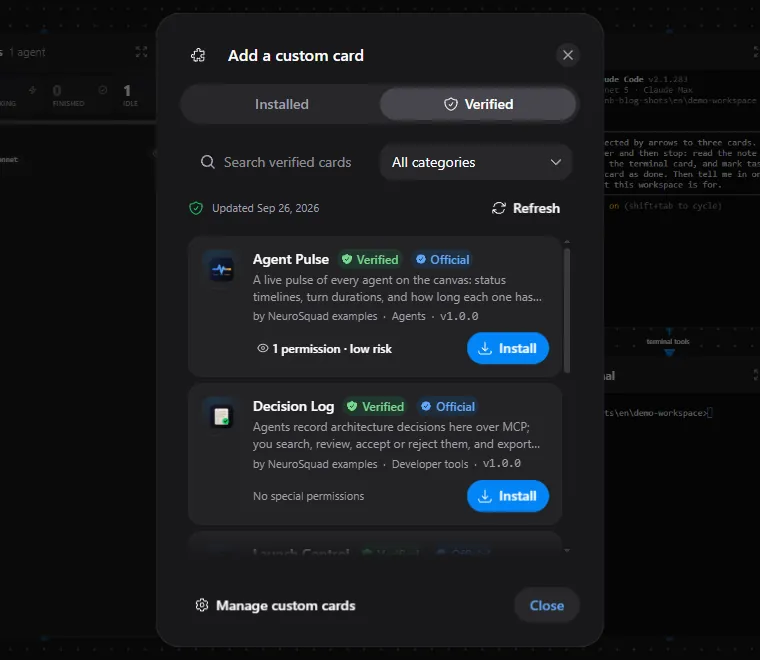
The badge is decided by the main process and means exactly this: the installed card comes from the reviewed repository, at the reviewed commit, and the hash of its files computed at install time equals the hash in the catalog. A local development folder, another commit or different files — no badge.
Installing from the catalog goes one step further: if the name, version or hash does not match the catalog entry, the install is refused. The choice here was between “install it without the badge” and “do not install it”, and a substituted package is not something to install quietly. A newer reviewed version is offered as an update with the usual permission diff, never applied by itself; a card that leaves the list loses its badge, and nothing is removed from your canvas.
MCP servers and skills, by arrow
The catalog in the app searches the official MCP Registry (about 35 thousand servers) and skills.sh (the 20 thousand most-installed skills). Search is local, in the app, over snapshots that ship with it and update incrementally — so it works offline and is instant.
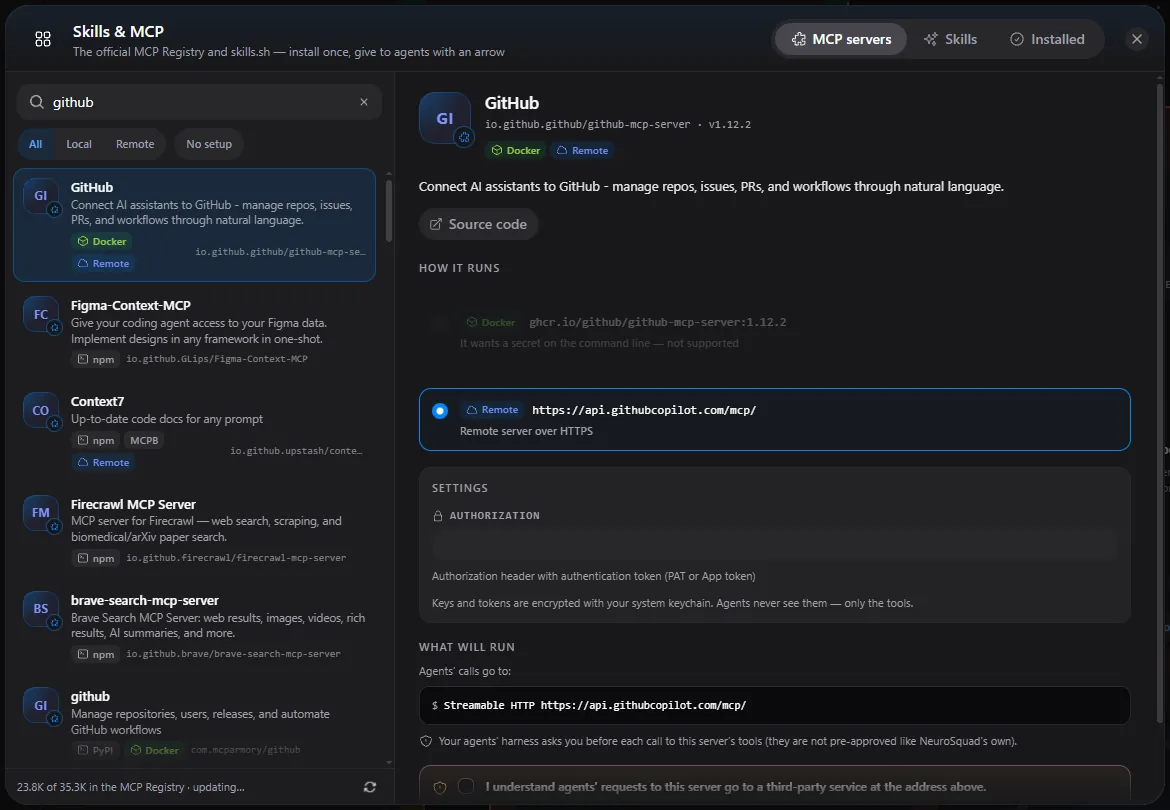
The obvious way to give an agent an MCP server is to write it into the agent CLI’s config. We deliberately did not. NeuroSquad is itself the MCP client of every server you install, and re-exposes that server’s tools through its own MCP server, as <alias>__<tool>, only to agents with an arrow to the server’s card, only while the arrow exists. Nothing is written to your CLI’s config folders, and a server’s secrets never leave the main process. Claude Code picks up a new arrow without a restart; other CLIs see it at their next start.
Figma Context
io.github.GLips/Figma-Context-MCP · v0.13.2
Connected agents: 0
Draw an arrow from this card to an agent.
2 tools figma_context__*

Skills work the same way, through one tool, skill_load, whose description lists the skills connected to that agent and when to use each. One flag made the difference between a feature and a demo: agents hide MCP tools behind a tool search, and in a live test a fresh agent never once loaded a matching skill. Marked “always load”, it loaded the right one on its own.
brainstorming
obra/superpowers
You MUST use this before any creative work - creating features, building components, adding functionality, or modifying behavior. Explores user intent, requirements and design before implementation.
Connected agents: 0
Draw an arrow from this card to an agent.
What a security review changed
Both releases went through a security review before shipping, and three results are worth describing:
- Every agent has its own token for the app’s MCP server, derived from a per-launch secret and the agent’s id. Before, one agent could in principle act as another; now another agent’s path answers 401.
- Third-party tools live on a second MCP server, which is not in the CLI’s list of pre-approved tools. So the CLI asks you before every call to a tool from someone else’s server — and the tool list is fingerprinted at install, so a server that changes its tools later waits for you to accept the changes.
- A skill is taken whole, from one commit. skills.sh’s own content hash could not be reproduced from the files it serves, so the app pins its own SHA-256 of the exact files you previewed, and installs exactly those.
Not everything fits. Figma’s official remote server answers 403 to dynamic client registration — it accepts only approved clients — so the catalog points to a community server that works with a personal token instead. Packages that need a local HTTP server are not supported yet. Both are written down rather than worked around.
More on the MCP servers and skills pages, and the full list in the changelog for 0.1.123 and 0.1.125.