Fifty cards, one canvas: where the CPU was going, and the Squad card
An idle canvas with three agent cards was using a full CPU core. The culprit was a cartoon. Here is what we measured, what we changed, and the card that now sits on every canvas.
NeuroSquad 0.1.117 is a release you mostly notice by what stopped happening: the fan spinning up while nothing is going on, a stutter when you drag a frame full of cards, a hitch every time you zoom out past the point where cards turn into tiles. It also adds the Squad card — the one board that tells you what every agent in the workspace is doing.
The goal for the canvas has been the same since the first weeks: up to fifty live cards — terminals, browsers, agents — with smooth pan, zoom, drag and resize. The rule for getting there has been the same too: measure first. Every number in this post comes from a separate instance of the app on a fresh profile, driven by real input events over the DevTools protocol.
Round one: fifty terminals
The first pass happened before the public release, on a workspace of fifty cards with twelve terminals printing as fast as they could. Zooming was slow for a reason that is easy to miss: the header of every card keeps a constant size on screen, and it did that with width and margin. Those are layout properties. Every frame of a zoom resized every header, which resized every card body, which fired every terminal’s resize observer — fifty terminal refits, fifty messages to the main process, fifty console resizes. Per frame.
The fix was to commit the zoom value once per gesture instead of every frame, resize terminals only when their grid of columns and rows actually changes, and swap live terminal grids for a static placeholder while the zoom is moving. Then the terminals moved from the DOM renderer to xterm’s WebGL renderer, which is where most of the time went: zoom median from 18.2 to 6.1 ms, p95 from 133 to 12 ms.
One measurement from that round decided a rule that is still in the code. Hiding terminals behind placeholders made zooming twice as fast (6.1 against 12.0 ms median) and panning slower (19.8 against 16.3 ms average): a pan just moves layers that are already painted, and swapping fifty grids out and back costs more than it saves. So placeholders appear only when a gesture actually changes the zoom.
Round two: the idle canvas
The second round started from a stranger complaint: the canvas was heavy while nothing was happening. Four parallel reviews of the code and one live profiling session on the “Launch day” workspace found not one cause but a pile of small constant costs. The largest one was a cartoon.
AI agent cards have a small mascot that shows the agent’s state. Its idle animations were infinite CSS animations on SVG children — and on those, the browser repaints on the main thread, every frame, forever. With three Claude Code cards on a canvas at 60% zoom, the renderer process used 98–104% of a core and the GPU 32–36%, doing nothing. Now only the “working” state loops, and it moves the HTML wrapper, which the compositor handles alone; every other state plays a few times and stops in a pose that already says what it means.
The rest was a list of things that each cost a little and all ran constantly:
- Selectors with
*and:has()under the canvas. Toggling a class on the canvas pane cost 25–34 ms of style recalculation each time, because rules like “every descendant of a gesture” had to be re-matched against every node of every card. Listing the elements that actually animate brought it to about 1.5 ms. - A CSS variable on the pane. The zoom level lived in a custom property on the element that contains every card, and changing it invalidated the style of the whole subtree, terminals included — 22–34 ms per commit. It is now one rule in a
<style>tag that targets only the elements that read it. - Buttons with their own layers. The component library gives buttons a GPU layer. Inside a canvas that meant dozens of extra layers; one override outside the pressed state took the count from 180 to 66.
- Timers in cards. Cards that poll — ports, budget, stand-up, the page watch — now tick only while their workspace is open and the window is visible, and they share one clock per period instead of one interval each.
- A browser card nobody was looking at kept streaming frames. Now frames flow only while some window shows the card: 0 in the overview and in hidden workspaces, back on return.
Long tasks during gestures disappeared from dragging a frame, marquee selection, zooming across the overview threshold and panning in the overview. Panning and dragging need about half the renderer CPU they did; style and layout time in a pan trace fell from 311 to 53 ms and from 378 to 28 ms.
When cards are too small to read
Zoom far enough out and a terminal is a grey rectangle. Below 55% (you can change the threshold in Settings), every card shows a tile instead: its icon, its name and one fact that matters for its kind — an agent’s status, 3/11 on a to-do list, the columns of a board, the first line of a note.
The card body stays mounted underneath, in its own size — the terminal is not killed, not even refitted. The tile is drawn in screen pixels, so it stays legible at any zoom. Crossing the threshold re-renders zero card bodies and each tile once; panning renders nothing at all.
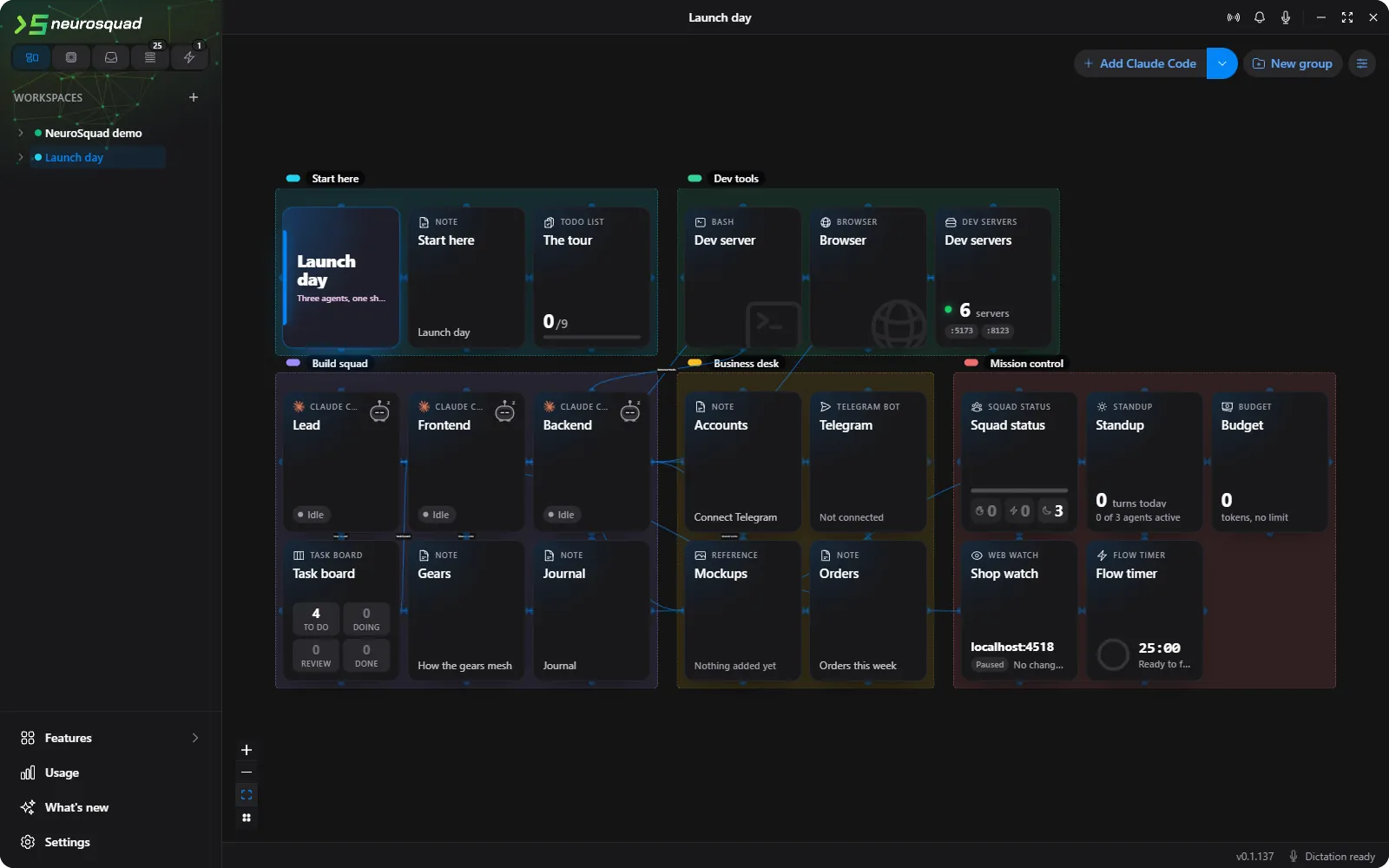
There is one subtle part. A terminal behind a tile is invisible but not paused — the terminal library’s own visibility check does not see CSS visibility — so it would keep rendering output nobody sees. Instead, the card collects the output and writes it in one go when you zoom back in. Except for one kind of chunk: a question the program asks the terminal (“what are you?”, “where is the cursor?”) is part of a conversation and must be answered now. A delayed answer showed up in a bash prompt as literal 1;2c — found live, and fixed.
The Squad card
With many agents on a canvas, “who needs me?” should not require a tour of the canvas. The Squad card answers it on one board: every AI agent in the workspace, grouped into needs you, working, finished and idle, with its CLI, its model and how long the current turn has been running. Click a tile to filter; click a row and the camera flies to that card.
The model column is more careful than it looks. It shows the model of the agent’s last request as recorded in its own session log; failing that, the model set on the card; failing that, the default from the CLI’s own config file. When none of those exist it says “Default model” — not a guess.
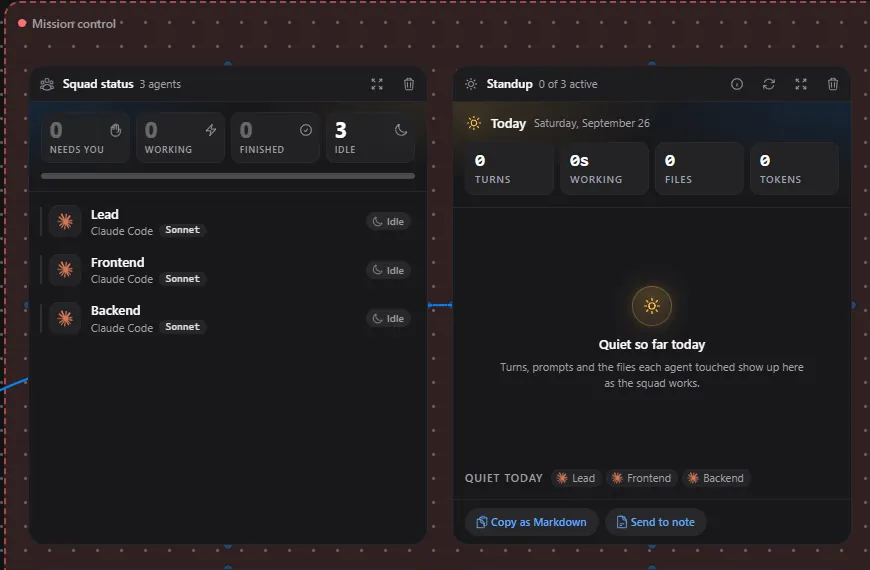
Squad is added to every workspace once, to the left of the leftmost card. If you delete it, it stays deleted — you can add it back from the menu. Getting “once” right took one more fix: the first version placed the card before the workspace’s saved layout had loaded, and the canvas then laid out every card from scratch. Opening an existing workspace for the first time could pile all its cards up in one corner. That is the bug listed under “Fixed” in this release.
The add-card menu changed too: agents come first, the ones installed on this computer are marked, there is a search box, and an empty canvas opens with big agent tiles. Full list in the changelog for 0.1.117.