Memory for agents, and statuses you can trust
An agent forgets everything when its session ends. NeuroSquad 0.1.222 adds Memory: draw an arrow and the agent can save what it learns and find it again next week — kept on your computer, searchable by meaning. And Claude Code cards no longer get stuck on Working.
Every agent session starts from zero. You explain that this repository uses pnpm, that migrations live in db/migrations, that nobody pushes to the staging branch by hand — and the next session, or the next agent on the canvas, has to be told again. Instruction files help with rules you write once; they don’t help with what an agent learns along the way.
NeuroSquad 0.1.222 adds Memory, a plugin card built on mem0, an open-source memory engine (Apache-2.0). Agents connected to it save what is worth keeping and find it again later — in another session, in another agent, after a restart. The memory lives on your computer, in the app’s data folder. There is no account to create and no server to run.
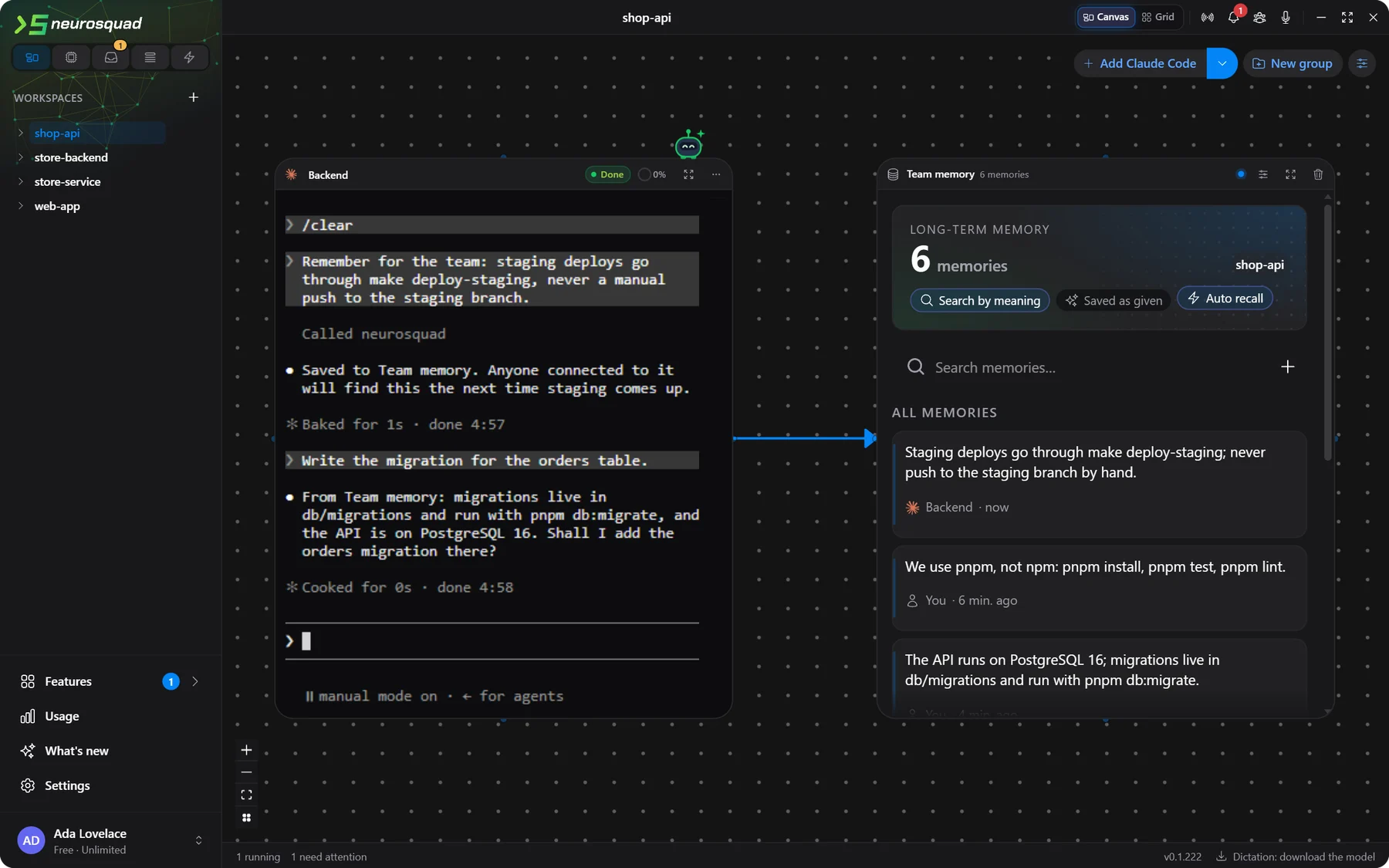
memory_add, and the card shows it with the agent’s name. Second turn: automatic recall adds the migrations note to the prompt. The agent runs against a scripted local model for this screenshot; the memory, the search and the recall are the real app.The arrow is the access
Like every plugin, Memory is a card. Draw an arrow from an agent to it, and the agent gets six tools: memory_search, memory_add, memory_list, memory_get, memory_update and memory_delete. Remove the arrow and they are gone; the memories stay on the card. Most CLIs see the change on their next tool listing, without a restart. Codex, Kimi Code, Cursor and Crush read their tool list once at start, so for them the tools are there from the start and the arrow decides whether a call goes through.
Memories belong to a scope, not to a card: this workspace (the default — every agent connected here shares them), all workspaces (for what holds everywhere, like your conventions), or per agent (each connected agent has a private memory; the card shows them all). An agent may edit or delete only the memories it saved itself, unless you switch on “Agents may edit any memory”. The tool descriptions tell agents that memories are notes, not instructions, and that secrets never go into memory.
Keyword search, and search by meaning
mem0 needs an embedding model to search. We didn’t want the card to need anything before it works, so the default is a built-in keyword index: it runs offline the moment the card is added and finds memories that share words or word parts with the question — “postgres” finds “PostgreSQL”. It doesn’t know synonyms, and the card says so.
The upgrade is Smart search: a multilingual sentence model, paraphrase-multilingual-MiniLM-L12-v2, that runs on your computer. One press on the card downloads about 150 MB once — the model, its tokenizer and a WebAssembly runtime — checks every file against its SHA-256, and re-indexes the memories you already have. WebAssembly was a deliberate choice: no native code means the same files run on Windows and on both kinds of Mac, with nothing to rebuild or sign. If you prefer, an embedding model on OpenRouter or on your own server (Ollama, LM Studio, llama.cpp, vLLM) works too.
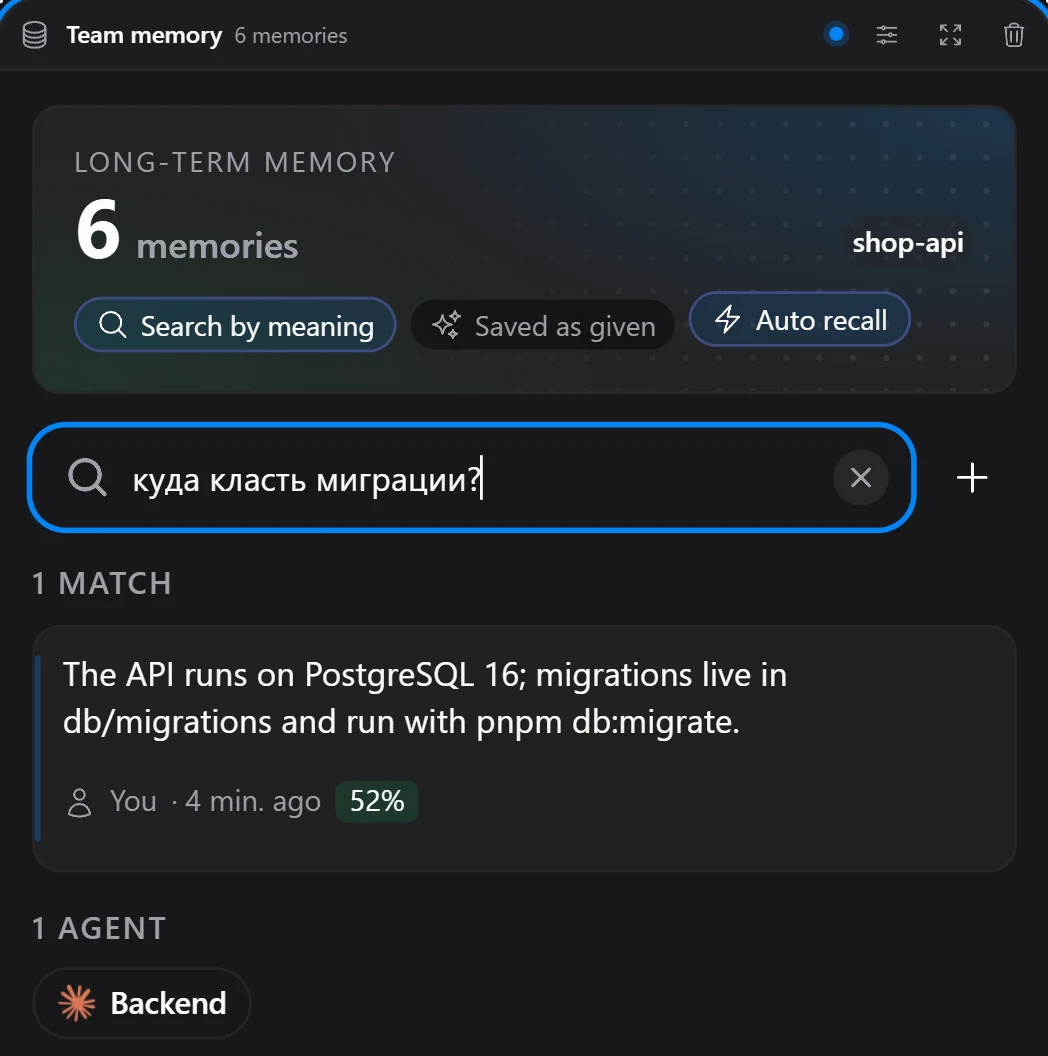
Why this model
We compared two models of the same size on pairs of English, Russian and Chinese text. multilingual-e5-small scored related and unrelated pairs almost alike — between 0.75 and 0.81 for both — and ranked “which package manager?” closer to a note about the database than to the one about pnpm. MiniLM kept them apart: about 0.53–0.58 for related pairs, under 0.25 for unrelated ones. That gap is what lets the card leave out memories that don’t fit. Scores stay modest, though, which is why automatic recall uses a stricter cut-off than the search box.
Smart search is not the default because downloading 150 MB on first use would make an agent’s first memory_add wait for it, and spend bandwidth nobody asked for. The card offers it where it matters, under the memory count.
Recall and saving without asking
Agents are told to search memory before work that may depend on earlier decisions, but they don’t always do it. Two switches on the card, both off by default, take that out of their hands.
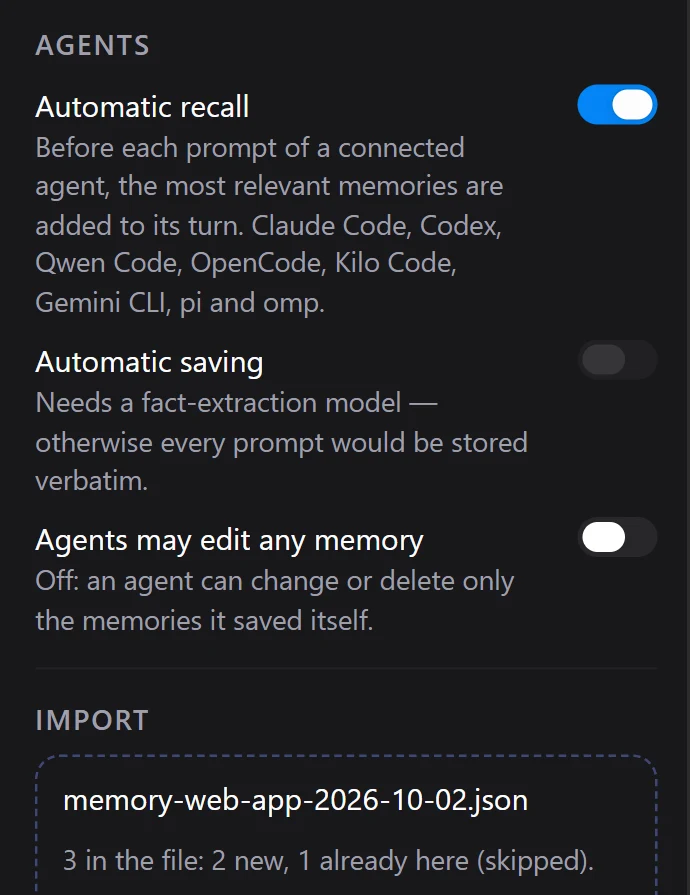
- Automatic recall. Before each prompt of a connected agent, the prompt is searched in the card’s scope and up to five fitting memories are added to that turn, marked as notes. If the search takes longer than three seconds, the turn goes without it. It works in Claude Code, Codex and Qwen Code through their prompt hook, in OpenCode and Kilo Code through NeuroSquad’s plugin, in pi and omp through their extensions, and in Gemini CLI through a hook of its own.
- Automatic saving. When a connected agent finishes a turn, your prompt and its final answer go to a fact-extraction model you choose on the card — on OpenRouter or your own server. The model keeps only lasting facts, often none. Without a model this switch stays off: otherwise every prompt would be stored word for word.
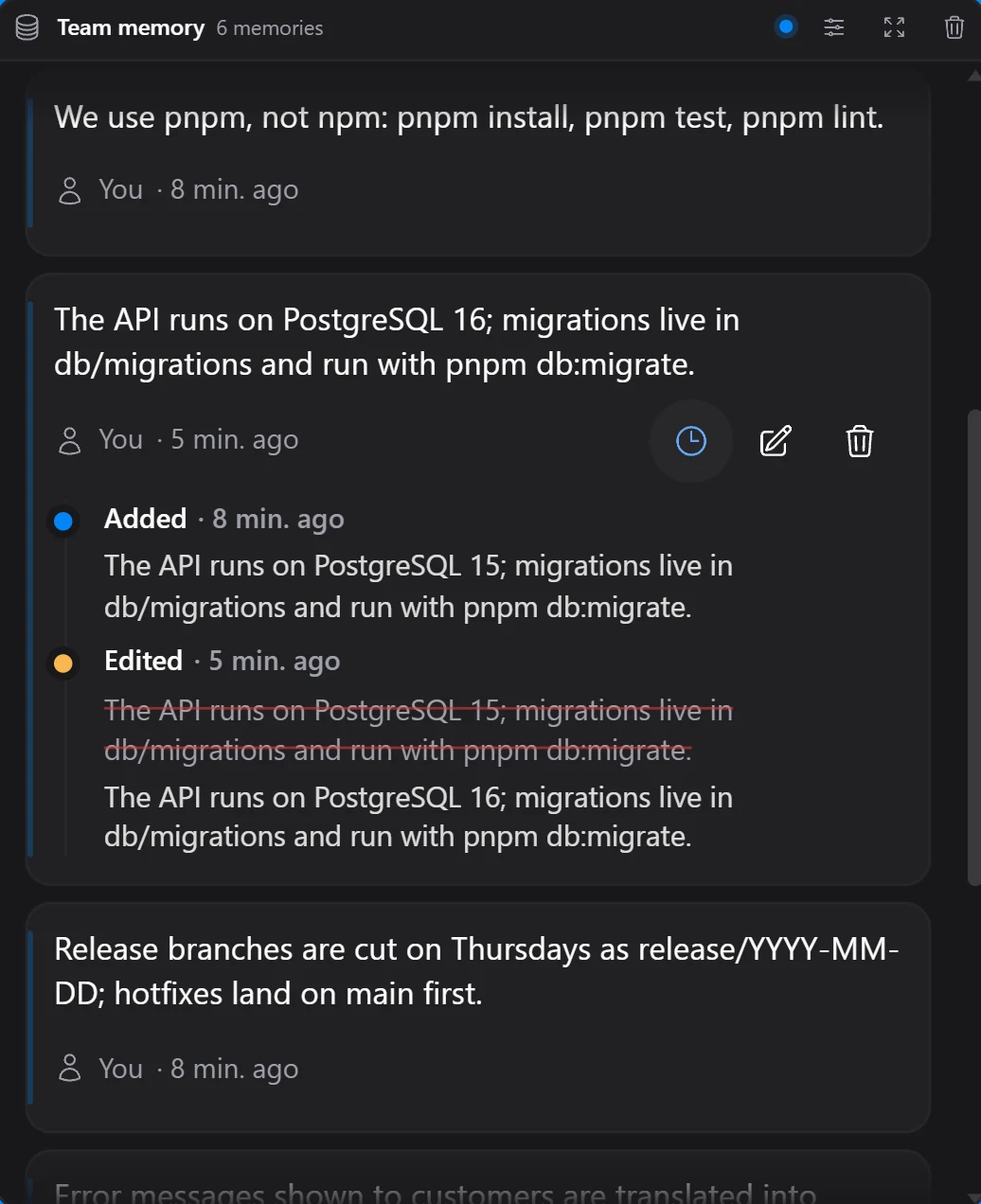
You stay in charge of what is kept. The card lists every memory with its author — you, an agent, or “automatic” — lets you edit or delete it in place, and shows its history. Export writes the scope to a JSON file; import reads it back with a preview before anything is written: how many are new, how many are already there and skipped. Undo removes exactly what the last import added. Deleting a workspace deletes its memories, deleting an agent deletes its private ones, and the delete dialog says how many first.
Claude Code statuses from the transcript
A card’s status — working, needs your answer, finished, idle — comes from the CLI’s hooks. For Claude Code that was not enough. We went through 14 of our own NeuroSquad Claude Code transcripts, event types only: in 166 turns there were 14 interrupts, 3 turns ended by a rate limit, and 38 prompts typed while Claude was still working. Seven of the recent turns ended with no Stop hook at all — after an Escape, or after an API error — and each of those left a card on Working. The Notification hook was the other problem: besides real permission prompts it also reports finished subagents, results of dialogs and other events, and the card turned some of them into “needs your answer” after a turn that had simply finished.
Claude Code writes every turn to a transcript file, and the hooks tell us where it is. Now each Claude card reads the new lines of its transcript while the agent works and checks the status against them: the end of a turn, an interrupt marker or an API error newer than the current state ends the turn; a turn that started after a finish makes the card working again. In our test an Escape in the middle of an answer sets the card to idle in about 0.3 seconds. An API error ends the turn with “Claude stopped: API error” and still rings, but the prompt queue is not sent into a failed turn. “Needs your answer” now comes only from a permission prompt or a question, and a Stop with a queued prompt behind it no longer rings “finished” between the two turns.
If a card still looks wrong, its menu has Copy status trace: the card’s recent status events and transitions, with event types only — no prompts, replies, commands or file names. Paste it into a bug report and we can see what the card saw.
The plugin has its own page, Memory (mem0), and a guide in the docs; statuses and notifications are described in Notifications. The full list of changes is in the 0.1.222 changelog.