NeuroSquad is an app on OpenRouter
NeuroSquad has its own page on OpenRouter now. Not because we asked — because every request our agents send there says where it came from. Here is what that gives you.
OpenRouter lists the apps that send traffic through it, each with a public page: name, icon, which models it runs. Since this autumn one of those pages is ours — NeuroSquad on OpenRouter. Nobody had to approve it. It exists because every request a NeuroSquad agent sends to OpenRouter carries our app attribution, and OpenRouter counts it.

A listing is nice, but the point is what sits behind it. NeuroSquad is a free desktop app for running many coding agents at once, and OpenRouter is how those agents reach models from many labs with one key. Here is what that looks like in practice.
One key, many agents, a model each
- Any OpenRouter model in 19 of our 22 agent CLIs. Claude Code, Codex CLI, OpenCode, Kilo Code, Qwen Code, Antigravity CLI, GitHub Copilot CLI, Hermes Agent, Pi, omp, aider, Goose, Crush, Factory Droid, Cline CLI, Kimi Code, MiMo Code, ZCode and PenguinHarness can all run on it. The other three — Cursor CLI, Amp and Auggie — run their models on their own vendors’ servers, so no app can point them anywhere else.
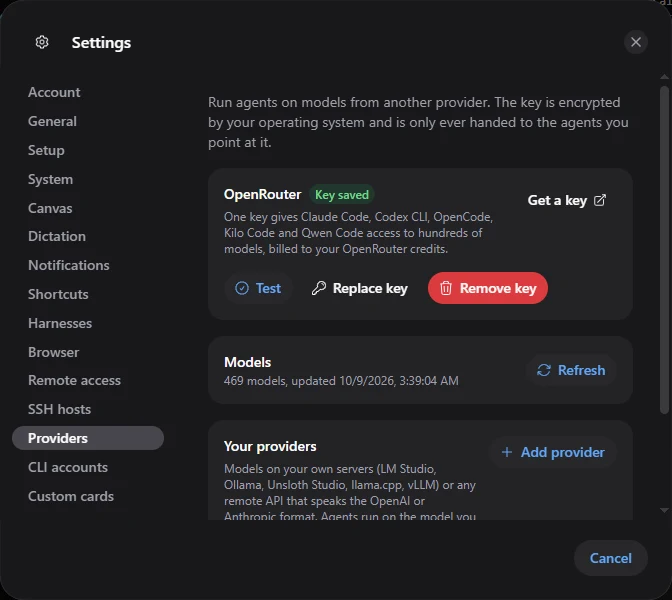
- One key for all of them. You paste it once in Settings → Providers. It is encrypted by your operating system and only handed to the agents you put on OpenRouter — in their environment, never on a command line, in a log or in a file.
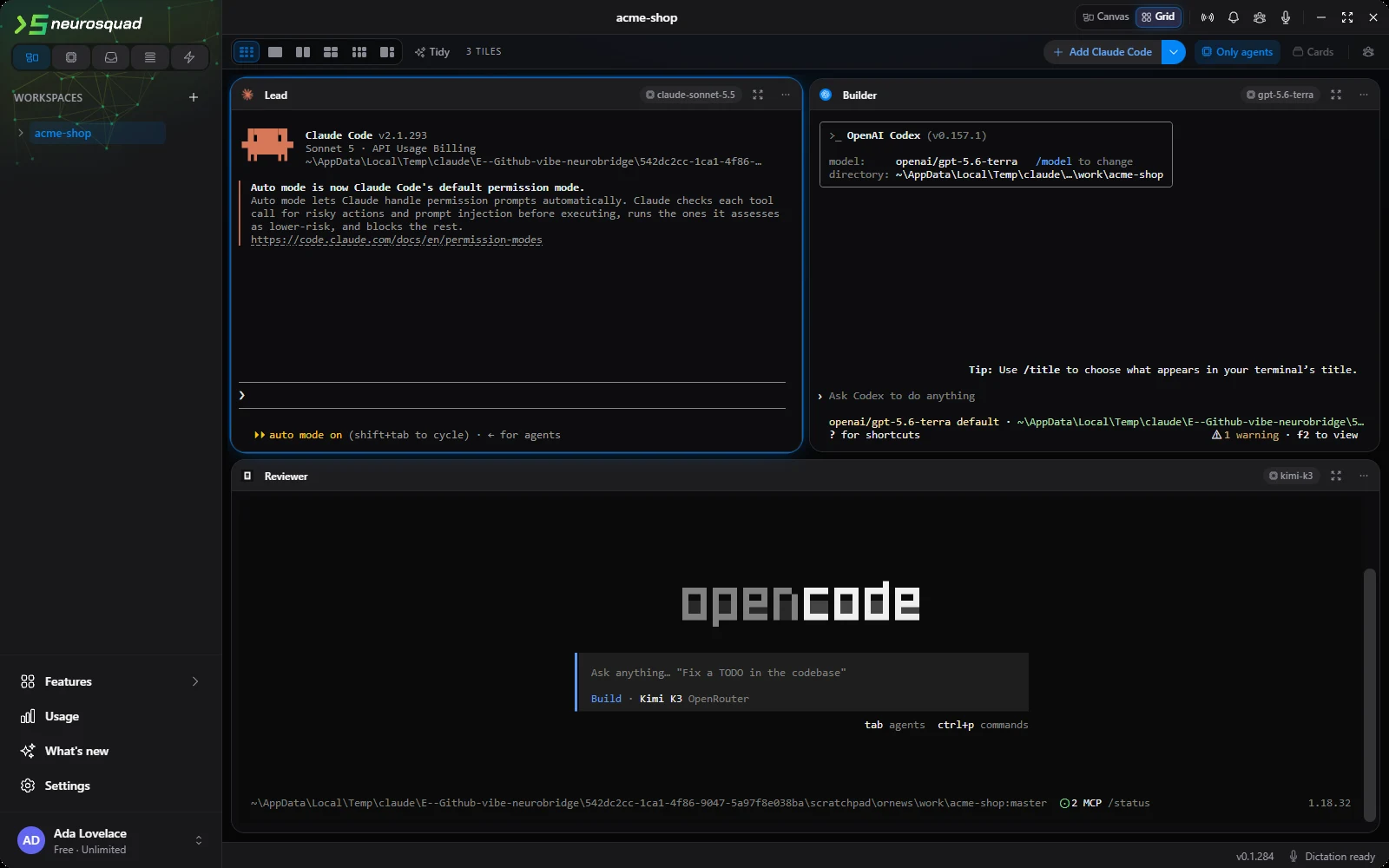
- A model per agent. Each agent card has its own provider and model, shown as a chip in its header. A lead on one model, a builder on another, a reviewer on a third — in the same workspace, at the same time.
- Your CLIs’ own settings stay untouched. NeuroSquad gives each card its own layer — environment variables, a config file of its own — and never writes your CLI configs. Without a key, nothing goes to OpenRouter: the agent runs on its own login and its chip turns amber.
How to set it up
- Open Settings → Providers. No key yet? Get a key opens OpenRouter’s site.
- Paste the key and press Save and test. The same page then shows what you have spent today, this week and this month, your limit if you set one, and the model catalogue.
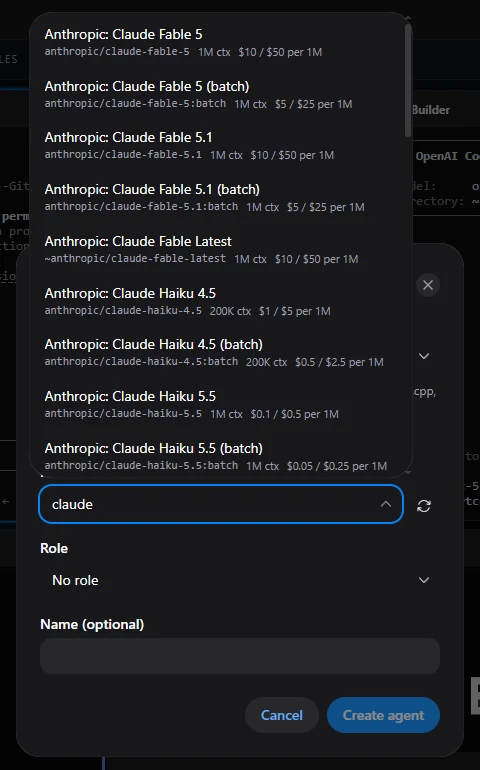
- In the add-card menu choose New agent…, pick the CLI, set Provider to OpenRouter and search for a model. Each one shows its context size and price per million tokens.
- Already have an agent? Provider and model in its card menu changes both; the agent picks them up on its next start.
What each agent costs
The Usage section counts tokens per agent from each CLI’s own logs and prices requests that went through OpenRouter at OpenRouter’s published price for that model. Tokens are whole numbers and money is counted in fractions of a cent, so ten agents on five models still add up exactly. A model with no published price is shown as unpriced — never as $0. Settings → Providers adds the key-wide picture straight from OpenRouter, and a Budget card pauses a workspace’s agents when they cross the token limit you set.
A reviewer on a different model
Models trained by different labs make different mistakes, which is exactly what you want from a reviewer. Add a reviewer in an agent’s menu starts a second agent in the same worktree with an arrow from the first; switch it to another OpenRouter model and the code gets a second opinion from a model that did not write it. The same goes for a lead that hands out tasks: a lead on a strong model, helpers on cheaper ones, each one’s cost visible in Usage.
Why we show up on OpenRouter
OpenRouter credits traffic to an app by request headers: the app’s address, its name and up to two categories. NeuroSquad does not make model requests itself — the CLIs do — so each CLI had to be made to send our headers. For every one of them it was measured, not assumed: we pointed each CLI at a local server that recorded what actually arrived, and changed the integration until the headers were there.
Several CLIs announce themselves to OpenRouter under their own name, so inside NeuroSquad their attribution is replaced with ours — for some of them also when you use your own OpenRouter login in that CLI. We send no visibility header, so the listing is public. It holds only what OpenRouter shows for any app: the name, the icon from our site and which models ran. No prompts, no code, nothing about you.
In the terminal too
NeuroSquad also has an open-source terminal version, nsq (MIT), on GitHub. It runs Claude Code, Codex CLI and OpenCode agents side by side in one dashboard, and it can put them on OpenRouter the same way: the key in your OS keyring, a model per agent, a picker with prices, and the same attribution on every request.
All of it in one free app
NeuroSquad costs nothing: no trial, no credits, no limit on agents or workspaces. You pay only for the models you use — your own CLI subscriptions or your OpenRouter credits. In the same app: 22 agent CLIs on a canvas or a grid, a model per agent through OpenRouter, the cost of each agent, your agents on your phone with nothing to install, and dictation that runs entirely on your computer.
Setup details are in the OpenRouter guide. Coming from another multi-agent tool? Switching to NeuroSquad maps what you know to where it lives here. A new install starts on the download page.