Why NeuroSquad: agents on a canvas, not in a row of tabs
Three weeks after the first commit, the first public build. What problem it solves, and the three decisions everything else in the app is built on.
Today NeuroSquad 0.1.91 went public — a Windows installer, ten agent CLIs, and a canvas. The first commit was on September 3rd, and along the way agents running in NeuroSquad’s own cards have helped build it. This post is about why it looks the way it does.
The problem: a row of tabs you have to babysit
Agent CLIs got good enough that one of them is no longer the bottleneck. You start a second one on the tests, a third on the docs, maybe a fourth on another repository. And then the work turns into watching: which tab has finished, which one has been sitting for ten minutes on a question like “may I run this command?”, which one is still going.
Tabs are the wrong shape for this. They hide everything except the one in front of you, they say nothing about state, and they know nothing about each other. An agent in tab three cannot look at the browser in tab five, even when that is exactly what it needs.
So NeuroSquad makes three bets. Every agent is a card with its real terminal on a canvas you can see all at once. The app tells you when an agent finishes a turn or needs you, so you stop polling. And an arrow between two cards lets the agent use what the arrow points to.
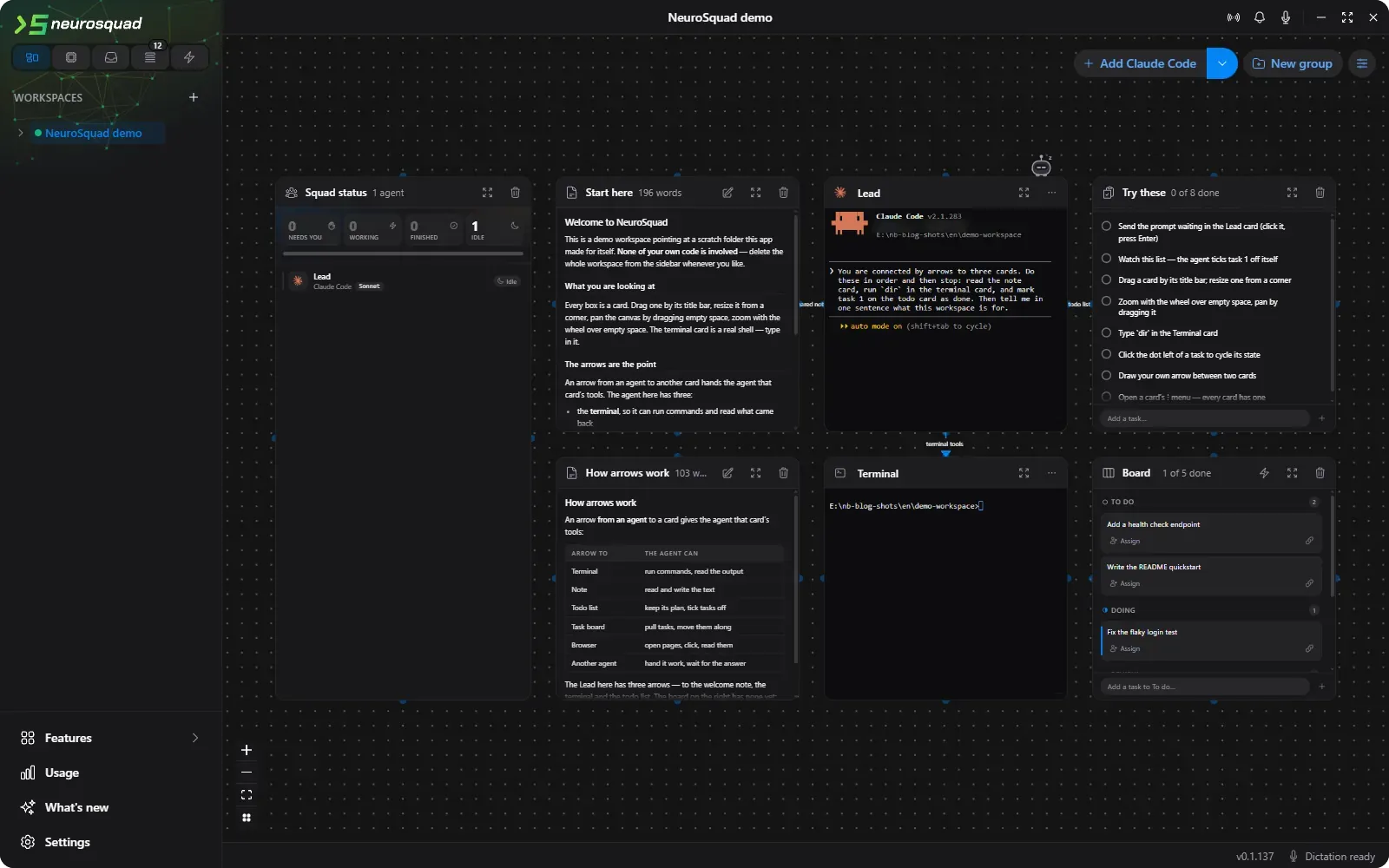
A card is a real terminal, and it must never die
A card is not a chat window pretending to be an agent. It is the CLI you already use — Claude Code, Codex CLI, OpenCode, Qwen Code and six more — running in a real pseudo-terminal, with its own interface, its own keys and its own quirks. If the CLI updates tomorrow, the card has the update tomorrow.
That choice set the first invariant of the whole codebase: the terminal component may never unmount while its agent is alive, because unmounting it kills the process. It sounds obvious. It turned out to shape almost every canvas feature:
- Switching workspaces does not replace the canvas. Every workspace opened in a session keeps its own canvas mounted, and the inactive ones are only hidden.
- Zooming into a group of cards is a camera move to the group’s frame, not a filter — filtering would unmount the cards outside it.
- Expanding a card to full screen is a 1:1 viewport plus a saved geometry, not a different component.
- The canvas library deletes a selected node on the Delete key. Here that would mean killing a session with one keystroke, so nodes are not deletable by the library at all: our own listener collects the selection and asks once, in a dialog.
A lot of Windows plumbing sits under the same bet. The CLI is resolved to an absolute path through the system’s own lookup, because a desktop app does not see the same PATH as your terminal. Paths are passed with forward slashes, because the pseudo-terminal library mangles backslashes — except for cmd.exe, which reads C:/… as a list of switches. Variables a parent agent leaves in the environment are stripped before a child agent starts, or the child quietly stops saving its transcript. None of this is visible, and all of it had to be found by running the real thing.
“Finished” and “needs you” are different events
The whole point of the canvas is that you look away. So the app has to know when to call you back — and there are two very different reasons. Finished means the agent completed its turn and you can read the answer whenever you like. Needs you means the agent is blocked, right now, until you approve something.
The first version could not tell them apart. It watched the terminal: when the window title stopped changing for 1.2 seconds and the output went quiet for 2.5 seconds, the turn was over. That is a fair guess for “finished”, and it is exactly the same silence as an agent waiting on a permission prompt.
The answer was to ask the agent itself. Claude Code has lifecycle hooks, so each card starts it with a small settings file on top of your own: when you submit a prompt it reports working, when it raises a notification it reports needs you, when it stops it reports finished. Each hook is a single curl line to a server the app runs on the loopback interface, with the card’s token inside the URL rather than in a header — so the command survives whatever shell it runs in.
Agents that report through hooks switch the old guessing detector off for themselves, or you would get two alerts and the guessed “finished” would overwrite the real “needs you”. CLIs without hooks still get the heuristic. Clicking a notification flies the canvas camera to the card, which flashes green long enough to still be flashing when the camera arrives.
Arrows are tools
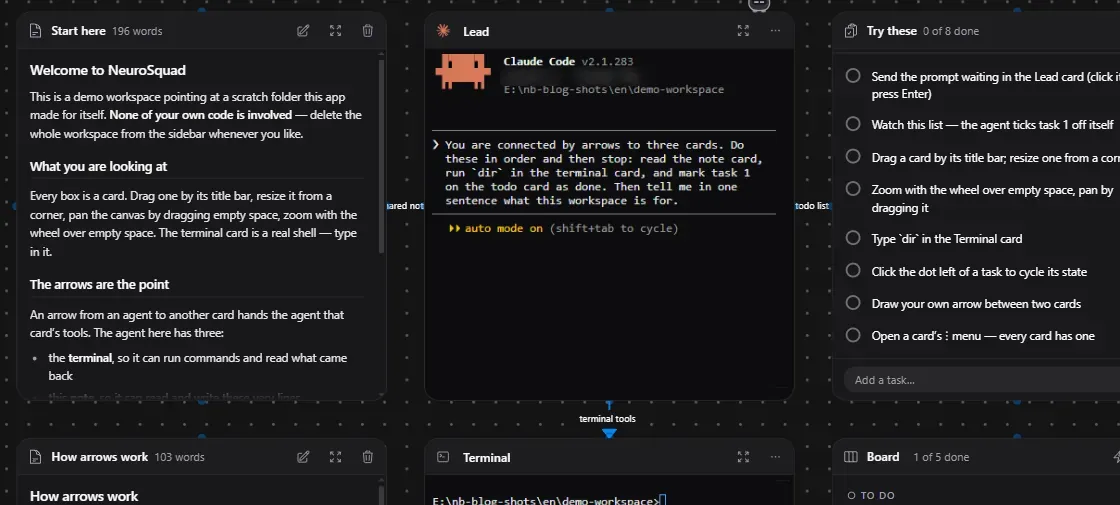
The third bet is the one people ask about most. NeuroSquad runs its own MCP server on 127.0.0.1, and every agent that speaks MCP gets a session on it. What that session contains is decided by the arrows on the canvas.
- An arrow to a browser card gives the agent
browser_*tools: a real Chrome, visible in the card, that the agent clicks and types into while you watch. - An arrow to a terminal card gives it
terminal_*: run a command in that shell and read its screen. - An arrow to a note gives it
note_*, to a to-do listtodo_*. - An arrow to another agent gives it
agent_*— and that arrow has a direction. It points from the lead to the helper; the helper cannot send work back up.
The arrow is the permission. No arrow, no tool — which makes the canvas an honest picture of what every agent is allowed to reach. And every call is drawn on its arrow as it happens, so you can see the lead handing a task to a helper instead of reading about it in a log.
One lead agent splits the work onto the board and hands each part over an arrow; every helper — Codex, Qwen, OpenCode — pulls its own task and moves it to Review when done.



Local by default
There is no account and no server of ours in the loop. Workspaces, cards and arrows are JSON files in the app’s data folder. Dictation is recognized on your computer, with Parakeet or Whisper. The Usage section reads tokens and cost from the agents’ own logs rather than from a proxy in front of them. Deleting a card never touches your project folder.
The release has more than this post can cover: remote access that runs the whole app in a phone’s browser, isolated git worktrees per agent, and a budget brake that interrupts every agent in a workspace when a spending limit is reached — with Ctrl+C, not a kill, so no session is lost.
What is next
The first build ships as a 550 MB installer, and most of it is a speech model that only people who dictate will ever load. That is the first thing to fix. After that: an installer that tells you exactly what is in its way, and updates that install themselves.
The full list of what is in 0.1.91 is in the changelog.