Lead agents can now move their helpers to another model or agent CLI
A helper stuck on a hard bug no longer has to wait for you to notice. In NeuroSquad 0.1.266 the lead agent can move it to a bigger model, another provider or another agent CLI, and the conversation goes with it.
A lead agent in NeuroSquad already starts helpers, gives them work over arrows and reads what they did. Until now it couldn’t change what a helper runs on. Picking the model is one of the main decisions in a squad: a small local model is fine for running tests, a stubborn bug may need a bigger one, and some tasks suit another agent CLI better. When a helper got stuck, the lead could only report it and wait for you.
NeuroSquad 0.1.266 lets the lead do it. It can move an agent it leads to another model or provider, or to another agent CLI altogether, in the middle of the work, and the conversation is kept. Prompts sent between agents are now checked until they really go out, and AI cards on Windows run on a newer console, so typed and pasted text arrives whole. This is a Windows release; the Mac app stays on 0.1.230 for now and gets all of this with its next build.
A new model, the same conversation
Ask the lead something like “the tests helper is stuck — put it on the bigger model on the GPU server”. It uses a new tool, agent_set_model, and the helper’s card relaunches with the same session: the same terminal, arrows and name, and the CLI picks the conversation up where it was. The target can be the CLI’s own subscription, OpenRouter, or one of your own servers — LM Studio, Ollama, llama.cpp, vLLM and the like.
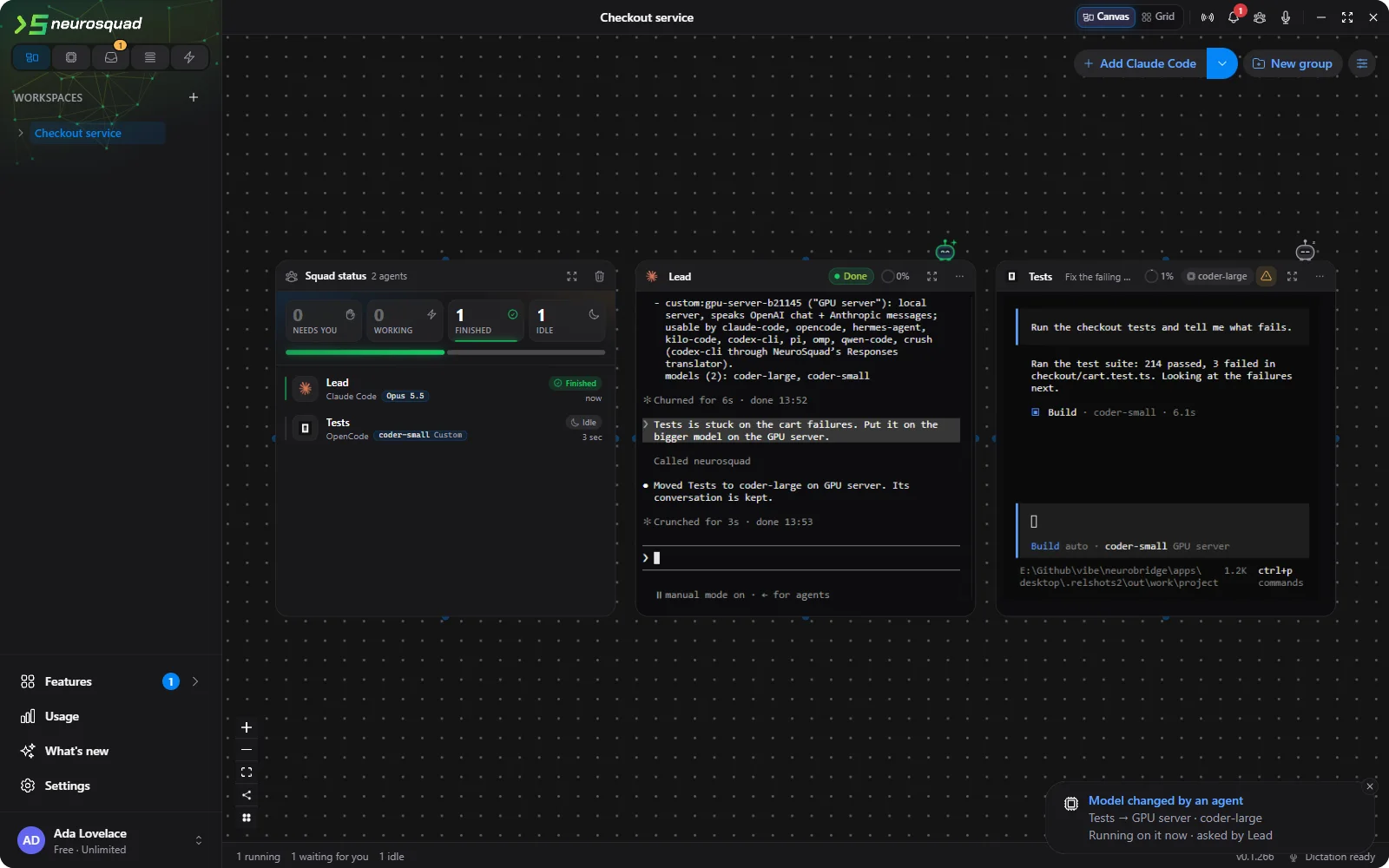
- It waits for the turn to end. A helper in the middle of a turn switches once that turn is over. If the lead asks for the change right away, the turn is interrupted first, the way that CLI is normally interrupted.
- You see every change. A notice in the corner says who changed which card to what. A change that is still waiting for a turn to end keeps its notice, with Cancel. The arrow between the two agents keeps the change in its log, and the card shows its new model.
- Only along an arrow. A lead changes only the agents it leads and itself — its own model always after its own turn. It can’t touch an agent it isn’t connected to or its own lead, and nothing changes while the workspace budget is paused.
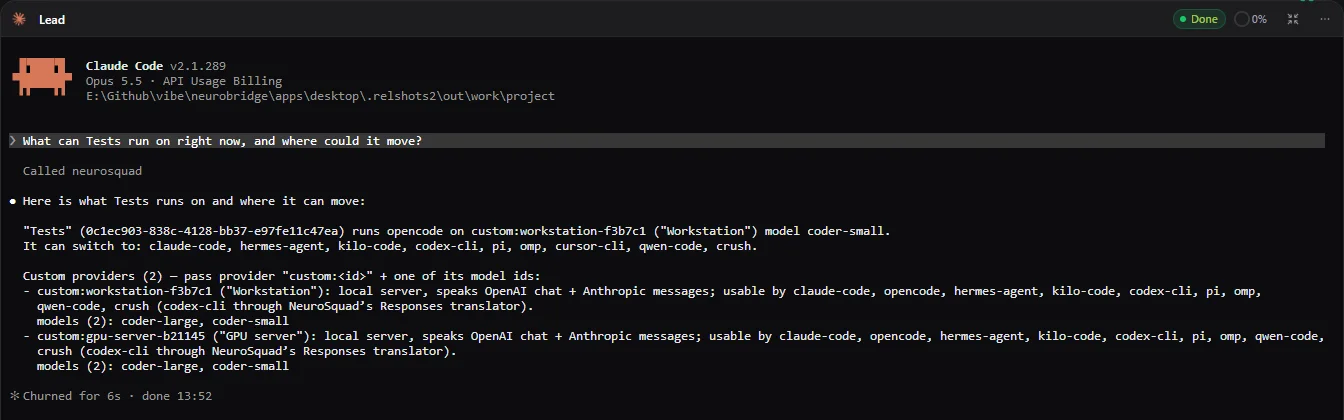
To choose well, the lead has to know what is available. neurosquad_models already listed the agent CLIs installed on the computer and how each one picks a model. It now also lists your own servers by name, the models each one serves and which CLIs can use it, and, for a given helper, what it runs on now and which CLIs it can move to. Keys and addresses are never in the answer.
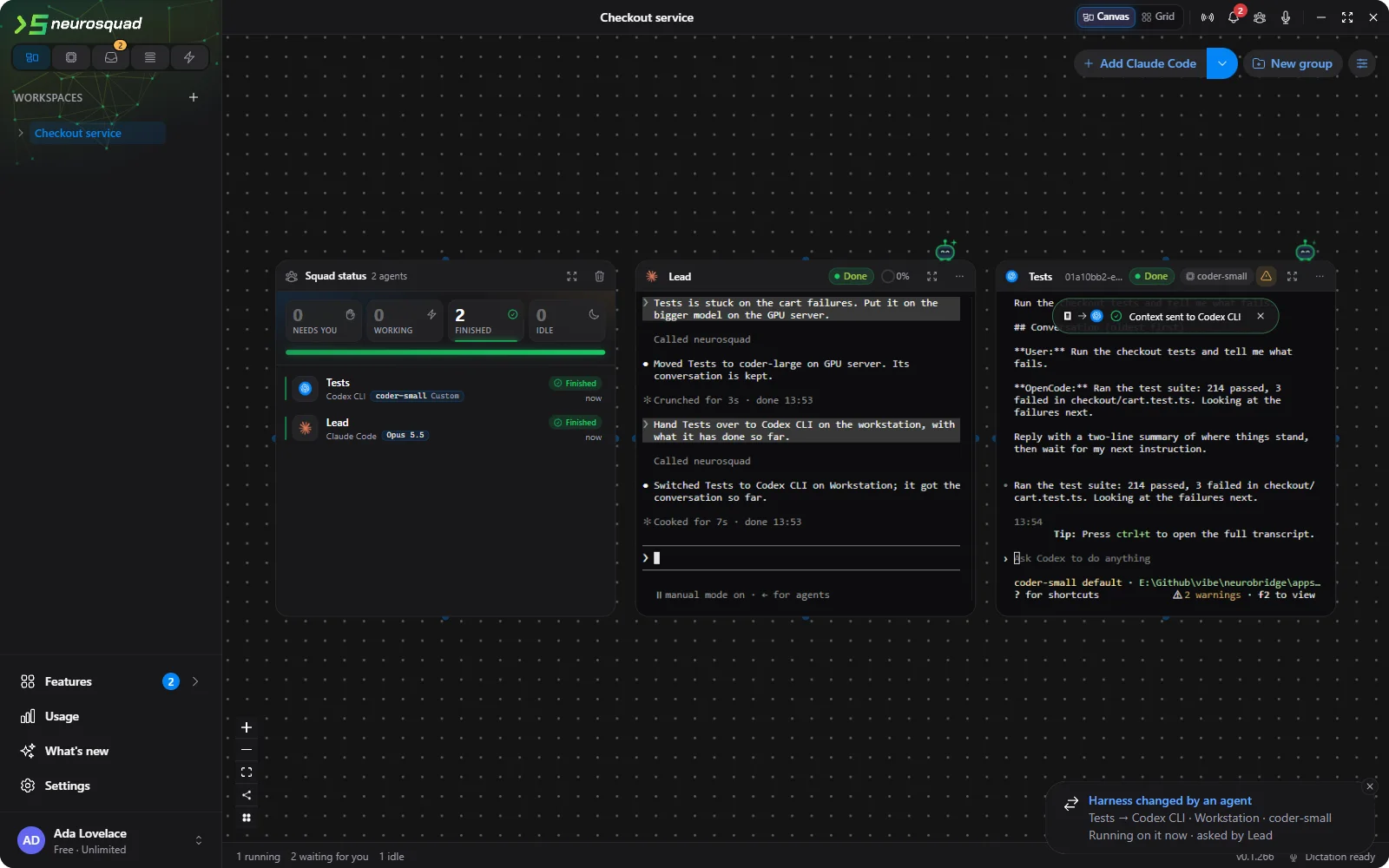
Another agent CLI, also from the lead
The second tool, agent_switch_harness, moves a helper to another agent CLI — OpenCode to Codex, Codex to Claude Code, any to any. It works like the card’s own Switch harness… from the previous release: the same card, arrows and name, the conversation so far handed to the new CLI as its first message, and switching back later resumes the original session. The lead can pick the provider and model for the new CLI in the same call.
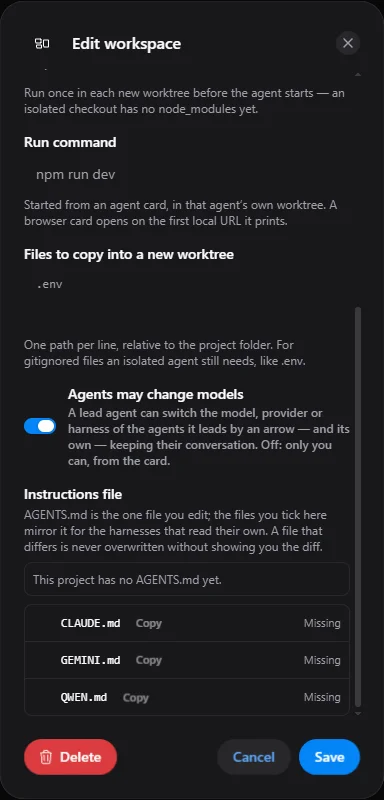
An agent that changes models on its own is something you may not want in every project. Each workspace has a switch for it — Agents may change models in the workspace’s edit dialog. It is on by default; turn it off and only you can change a card’s model, from the card.
Prompts that really get sent
Agents send each other prompts all the time: agent_send, a note’s Send to connected agents, the harness switch, the prompt queue. Every one of them types text into another agent’s terminal and presses Enter. Testing the model switching, we kept finding prompts that were typed but never sent. Codex on Windows reads a long paste slowly, and an Enter that arrives too early becomes a line break inside the paste. A CLI that is still starting can take the text but miss the Enter.
So sending a prompt is now checked from start to end. NeuroSquad waits until the CLI is ready, types the prompt, waits until the CLI has taken all of it in, and only then presses Enter. Then it checks that a turn really started — from the CLI’s own events where it reports them, otherwise from the screen. A prompt still sitting in the input box gets Enter again, at most twice; the text is never typed again, so a prompt can’t go out twice. If it still isn’t sent, the sender is told so, instead of the prompt quietly waiting in the box. An agent busy with a turn gets the prompt through its queue when the turn ends.
A newer console for AI cards on Windows
While looking at those lost prompts, we found the cause of an older problem. Every terminal on Windows runs through a console layer, and the one built into Windows 10 changed some input on its way. Codex CLI lost characters that the active keyboard layout doesn’t have — [ and ] under a Russian layout, the typographic apostrophe and the dash under any — so it’s arrived as its. A long paste into Claude Code could arrive in pieces and never be sent.
AI agent cards now run on a newer version of that console layer, which ships with NeuroSquad. Both problems are gone, for text you type into a card and for prompts the app sends. Shell cards stay on the system console.
Fixes
- Codex CLI on your own servers: a reply the server cut off is reported as incomplete, and a broken stream as failed, instead of looking finished; several tool calls in one answer no longer merge; a Codex card refuses to start while the local translator is down instead of falling back to your OpenAI login.
- Workspace recording: a recording keeps only what belongs to its workspace and masks keys and tokens it finds; the player and the Recordings list no longer pass Delete, Ctrl+Z or Space to the live canvas behind them; a failed Stop no longer leaves the Recording chip on.
- Run Stats and Agent Pulse: a working stretch cut short by a crash no longer runs on, and Hermes Agent and Droid usage is no longer counted twice.
- Graphify and Code Graph no longer re-index after you quit or delete the card. Templates: an unverified card that isn’t installed yet gets no arrows, and a Budget card in a template can only tighten a limit, never unpause a workspace.
How a lead works with helpers is described in Lead agent. The full list of changes is in the 0.1.266 changelog. NeuroSquad updates itself; a new install starts from the download page.