Agents now pick their own plugins, skills and MCP servers
Until now, giving an agent a tool meant you drew the arrow. In NeuroSquad 0.1.270 the agent can look up what is available and connect it to itself, and nothing new is installed without your yes.
In NeuroSquad an arrow is a permission. Draw one from an agent to a Memory card and the agent gets memory_* tools; draw one to a skill or an MCP server card and it can use that. It is a clear model, but it puts one job on you: knowing in advance what each agent will need. In practice the agent is the first to find out — halfway through a task it turns out that the project’s decisions should survive the session, or that the documentation of a library would save ten guesses.
NeuroSquad 0.1.270 lets the agent do that part. It can see which plugins, skills and MCP servers it could have and connect the one it needs to its own card. Anything that isn’t installed yet still waits for your approval. Cards also stay working while their subagents run, and the tokens those subagents spend are counted once, with their own share. The add-card menu is now two columns with everything in view, and there is a long list of fixes. This is a Windows release; the Mac app stays on 0.1.230 for now and gets all of this with its next build.
An agent that equips itself
Every agent card now has two more built-in tools. neurosquad_catalog lists what the agent could use: the plugins (Memory, Context7, Graphify, RTK, Caveman and the rest), the skills and MCP servers already installed on this computer, and — when the agent searches — matches from skills.sh and the official MCP registry. Each entry says what it is for, which tools it would give, and its state for this agent: already connected, on the canvas, available, not installed, needs settings, or simply not usable with that agent CLI or in a WSL or SSH workspace.
neurosquad_equip then adds the chosen one. If a matching card is already on the canvas, the agent only gets an arrow to it; otherwise a new card appears beside the agent, in its frame, with the arrow drawn. The same rules as for arrows you draw apply: a paused budget stops it, sensitive cards the agent didn’t create stay out of reach, and one agent can add at most eight cards of its own.
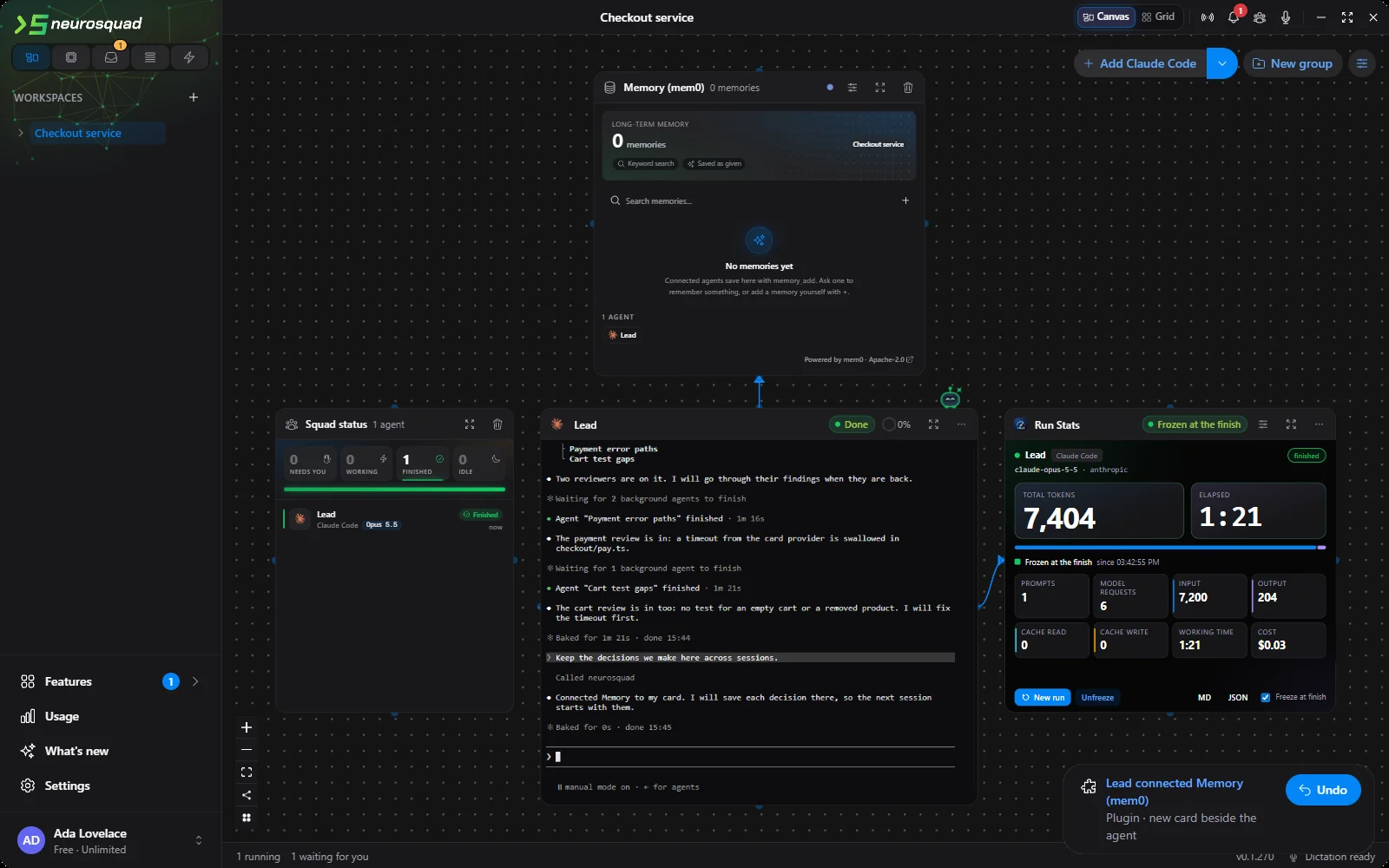
You see each of these changes: a notice in the corner says which agent connected what, and Undo takes it back — the card if the agent created one, only the arrow if the card was already there. Plugins and things already installed connect at once and work in the same session; the agent can call the new tools in its very next step.
Nothing new without your yes
Installing a skill or an MCP server means running someone else’s code on your computer, so an agent can never do it by itself. When it asks for something not yet installed, NeuroSquad shows a dialog with what would be installed: the package, where it comes from, the version and the exact pinned hash or commit, the license, its files and scripts, and the results of the security scans the catalog has. Only Install and connect installs it, through the same pinned installers as the catalog. Deny, or no answer within ten minutes, installs nothing, and the agent is told so.
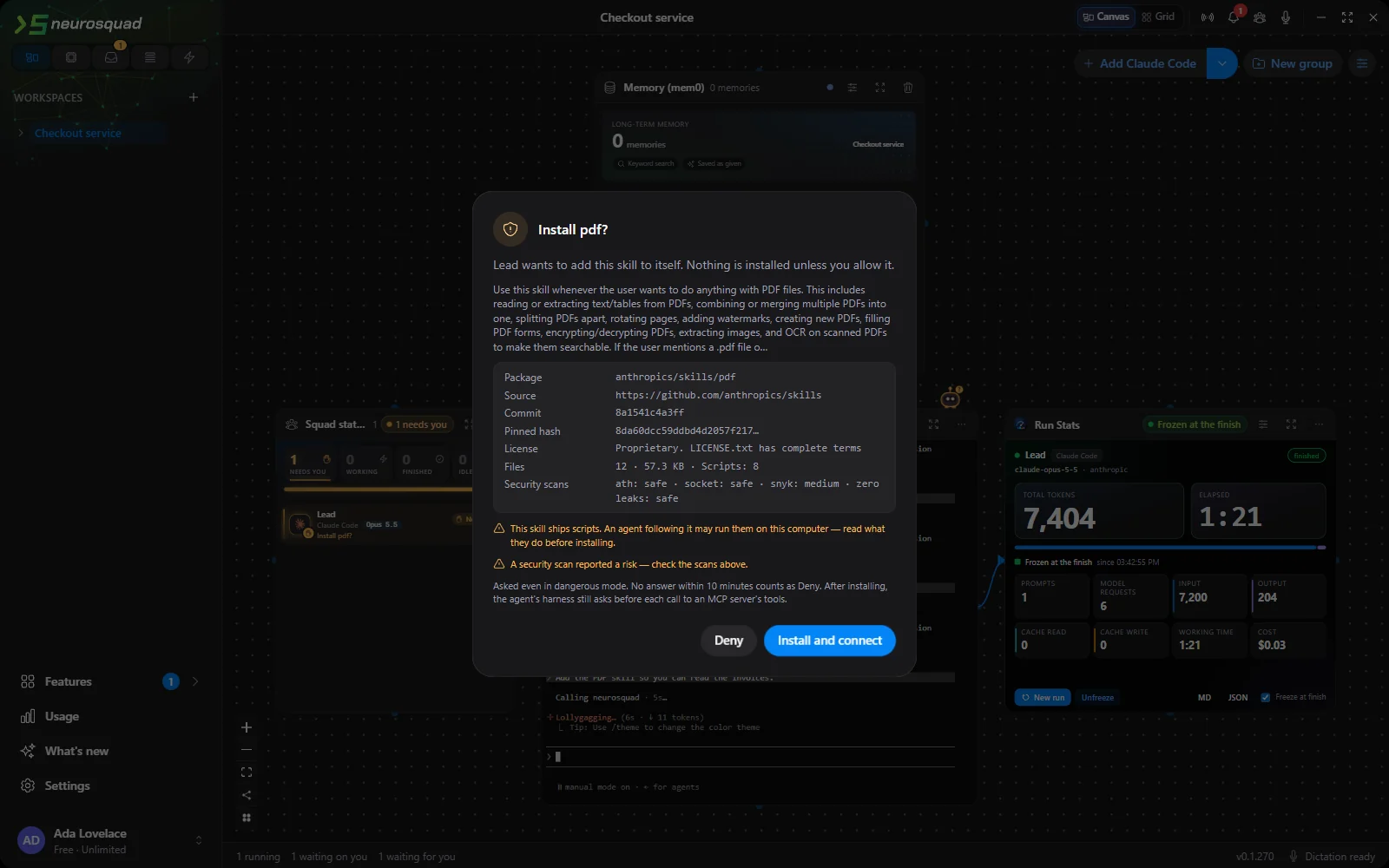
The dialog comes up in dangerous mode too, and in canvas mode. A server that needs a key or other settings opens the catalog instead, since an agent can’t fill those in. If you would rather connect everything yourself, the workspace’s edit dialog has a switch, Agents can add plugins, skills and MCP to themselves. It is on by default.
How an agent knows what to ask for
Tools only help if the agent thinks of them. So once per session, with its first prompt, an agent gets a short note: the two tools, the rule about installs, and the plugins and installed items that would work for it. The note is capped at 1200 characters, roughly 300 tokens, and it isn’t repeated later in the session. It reaches Claude Code, Codex and Qwen Code through their prompt hook, and OpenCode, Kilo Code, pi, omp and Gemini CLI through the same bridge that Memory already uses. Other agent CLIs still have the tools and their descriptions, just without the note.
One difference between CLIs showed up while testing. Some, like Codex, read their list of tools only once, at the start. For them the plugin and skill tools are now listed from the start, so equipping one works in the same session. A newly added MCP server’s own tools reach such a CLI only after the card restarts, and the agent is told that.
Subagents: still working, counted once
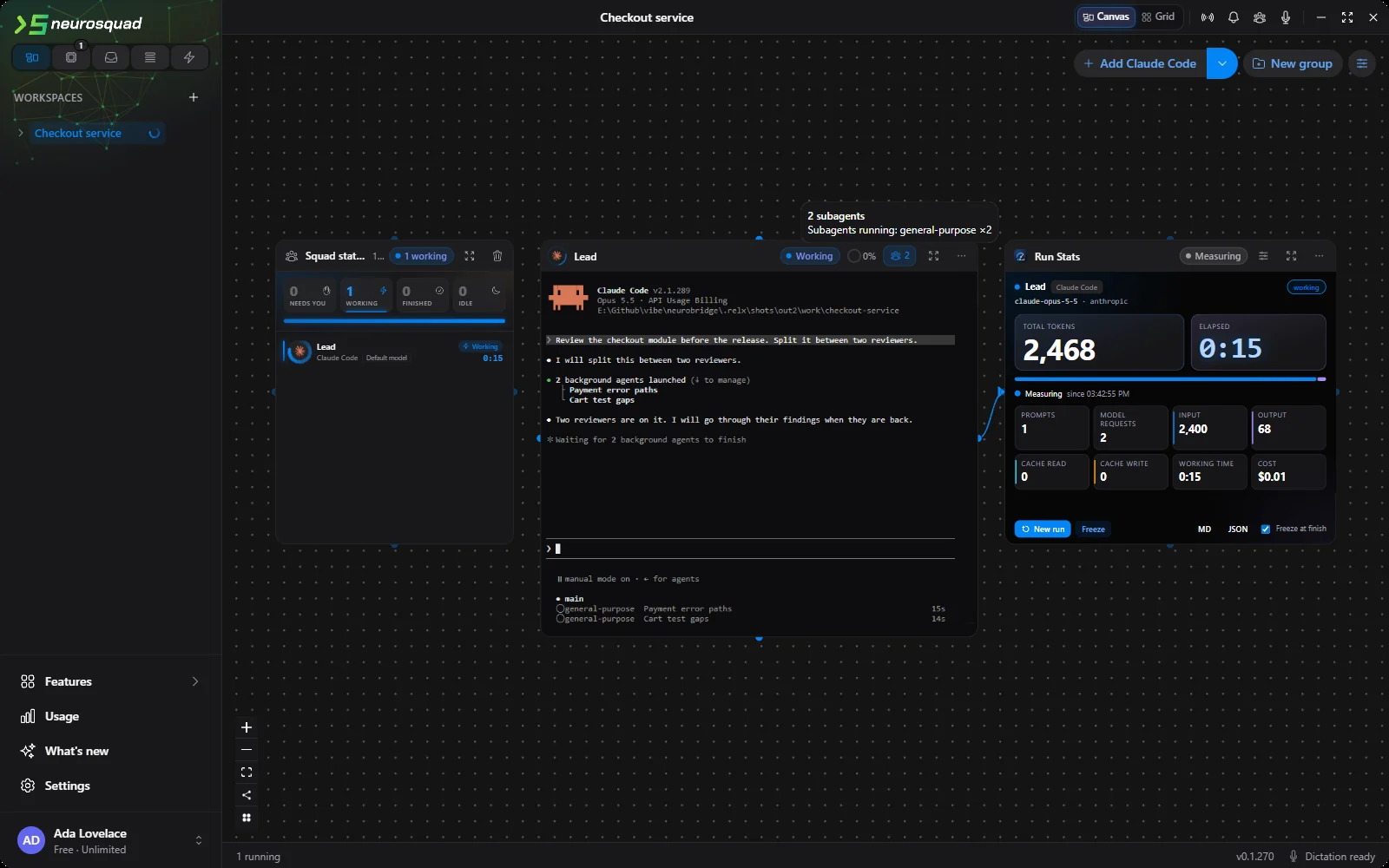
Many agent CLIs can hand part of a task to a subagent — Claude Code’s Agent tool, OpenCode’s task sessions, Qwen Code’s agents. Recent versions of Claude Code start them in the background by default: the main agent answers “two reviewers are on it” and ends its turn while the subagents keep working. For NeuroSquad that turn end looked like the end of the work, so the card said done and rang while two subagents were still busy.
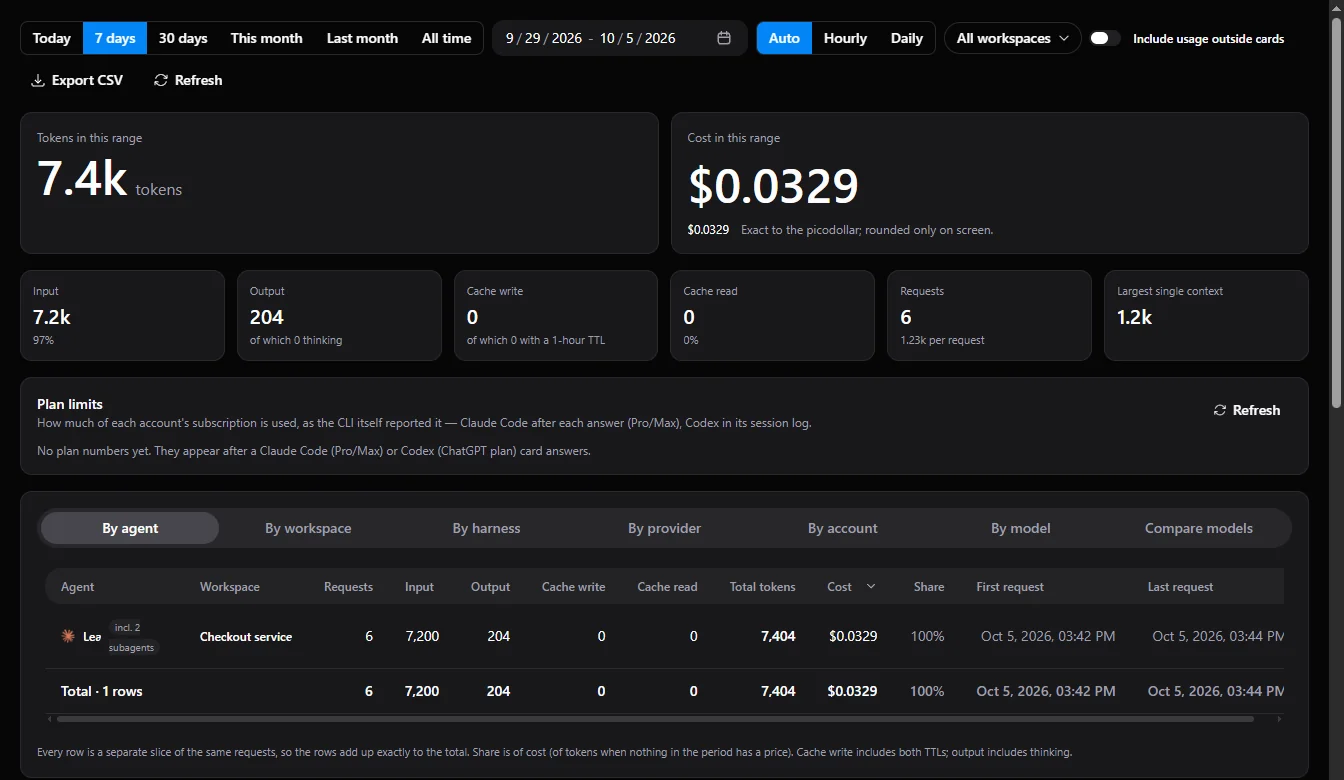
Now a card keeps track of the subagents its agent started. While any of them runs, the card stays working, and it finishes only when the whole job is done. A chip in the card’s header shows how many subagents are running, and its tooltip lists their types. If a subagent needs a permission, the question shows on its parent card with the subagent’s name in front. Claude Code, OpenCode, Kilo Code and Qwen Code report subagents this way.
The second half is money. A subagent’s model requests are paid for like the agent’s own, so they belong to its card — and they must be counted exactly once. Checking every CLI, we found three places where that didn’t hold. Kilo Code adds a subagent’s cost to the message that started it, which was counted a second time. A forked Codex subagent copies its parent’s history into its own log, tokens included. And Hermes Agent’s child sessions were never credited to the card at all. All three are fixed.
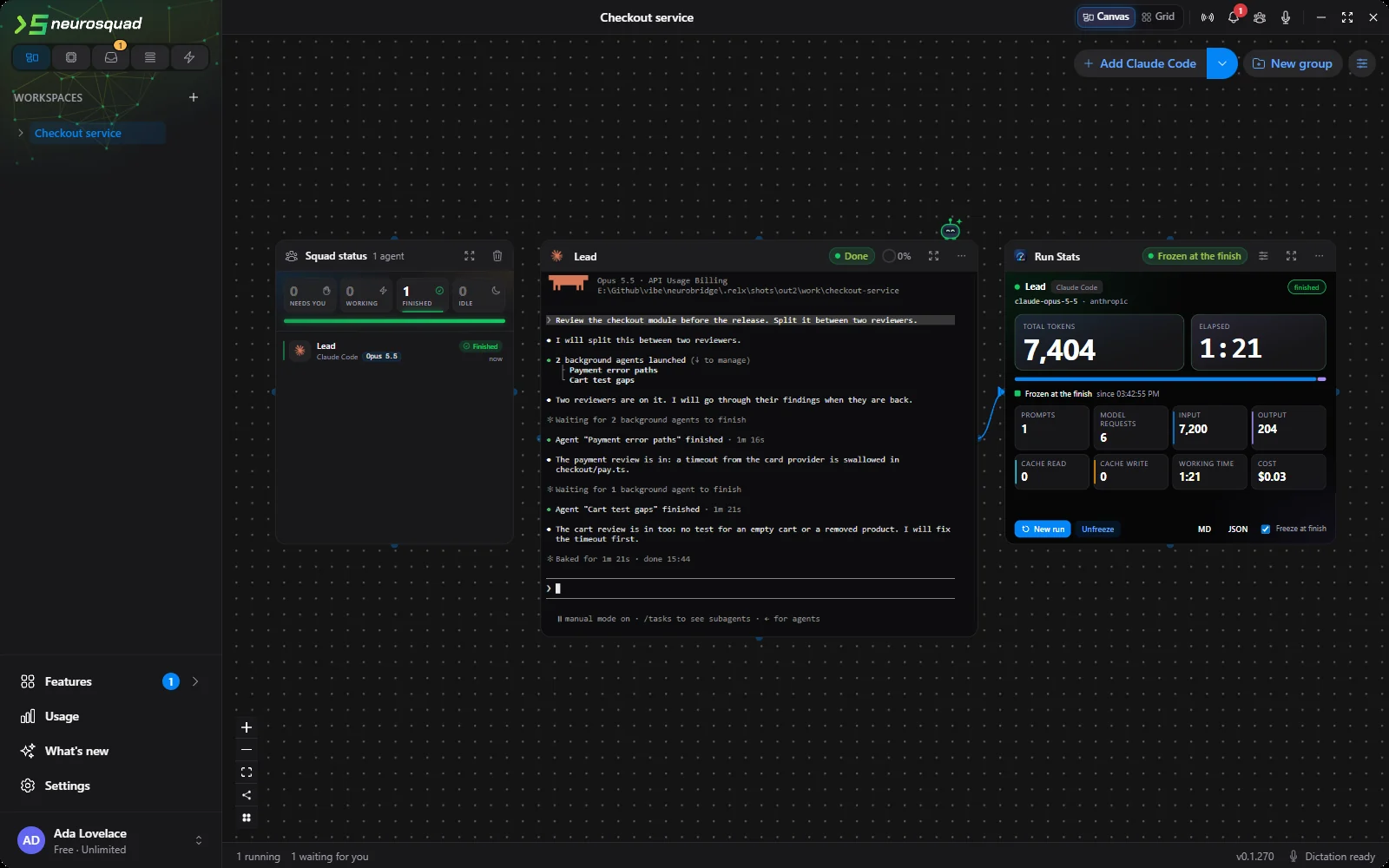
The totals in Usage, Run Stats and Agent Pulse include subagents, and Usage marks an agent’s row with incl. N subagents; its tooltip shows their tokens, requests and cost. For people who build their own cards, Card SDK 1.3 adds the same split: agents.usage gets a subagents part and a mainOnly option, and each request in agents.timeline says whether a subagent made it.
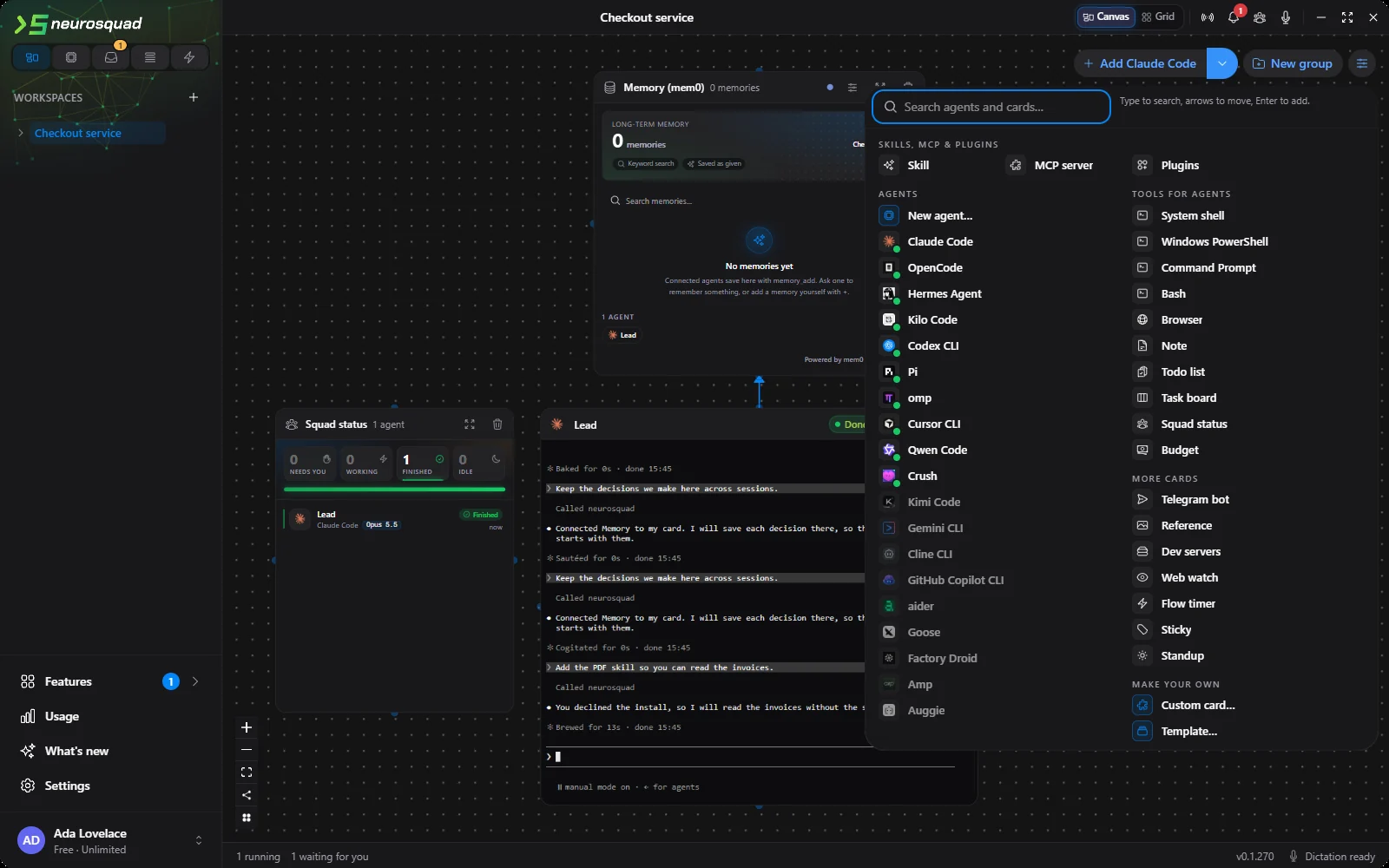
The add-card menu, all of it at once
The add-card menu had grown into folded groups you had to open one by one. It is now two columns: agents on the left — installed CLIs first, marked with a green dot, then your saved agent templates — and cards on the right, with Skills, MCP and Plugins across the top. Everything is visible without scrolling in a 1280×800 window. The row under the pointer is explained next to the search field, typing filters both columns, and the arrow keys move up and down a column and across to the other one.
Fixes
- Agent status: a restarted CLI’s old process reporting late no longer moves the status, a prompt waiting in Claude Code’s own queue no longer ends in a false “finished”, and a pop-out window or the phone no longer plays a second sound.
- Terminals: your own
CLAUDE_CODE_*settings, such as the Git Bash path, now reach Claude Code cards; only the markers of a parent Claude Code session are removed. - Plugins: Memory search no longer waits behind a save, Memory and Context7 can no longer hold up a prompt, Caveman resends its rules when they didn’t arrive, and RTK uses exactly the
rtkthe agent’s shell will run. - Budget and browser cards: Resume after the limit gives about another tenth of it and pauses again; deleting a browser card deletes its profile — cookies, logins and history.
- SSH, WSL, dictation, account: host keys are checked the way OpenSSH does, WSL survives
wsl --shutdown, model downloads are checked against a pinned SHA-256, sign-in codes work only once for the session that asked for them, and the phone reconnects after the desktop restarts.
How agents equip themselves is described in Skills, MCP and plugins. The full list of changes is in the 0.1.270 changelog. NeuroSquad updates itself; a new install starts from the download page.