Record a workspace and replay it, and measure every agent run exactly
Give three agent CLIs the same task, then go back and watch exactly what each of them did, with the numbers next to it. NeuroSquad 0.1.264 records a whole workspace, replays it on a timeline, and measures every run with two official cards.
A common way to use NeuroSquad is to give several agent CLIs the same task and see which one handles it better: Claude Code, OpenCode and Codex side by side, each with its own browser card, all working from one note. While they run, the canvas shows everything. Afterwards, most of it is gone — terminals scroll, browser cards move on, and “which one was faster, and why” turns into guessing.
NeuroSquad 0.1.264 keeps the run. Workspace recording saves everything a workspace shows and replays it on a timeline. Two official cards, Run Stats and Agent Pulse, measure each agent’s run in exact numbers. A note can now send itself to every agent it is connected to, and Codex CLI works on local model servers that only speak Chat Completions. This is a Windows release; the Mac app stays on 0.1.230 for now and gets all of this with its next build.
Workspace recording
Open the canvas tools menu and choose Start recording. A red Recording chip with the elapsed time appears in the title bar and stays there until you stop it. From that moment NeuroSquad writes down every byte each terminal prints, every resize and status change, the canvas with its cards, frames and arrows, the text of notes and to-do lists, the frames browser cards show, and about once a second a picture of the other cards on screen.
Canvas tools → Recordings… lists what you have recorded. Replay opens a read-only copy of the canvas, laid out and zoomed the way your window was, and plays it back. The terminals are not videos: the recorded bytes go back through the same terminal engine, so colours, cursor moves and full-screen redraws come out exactly as they were, and you can stop on any moment and read the text.
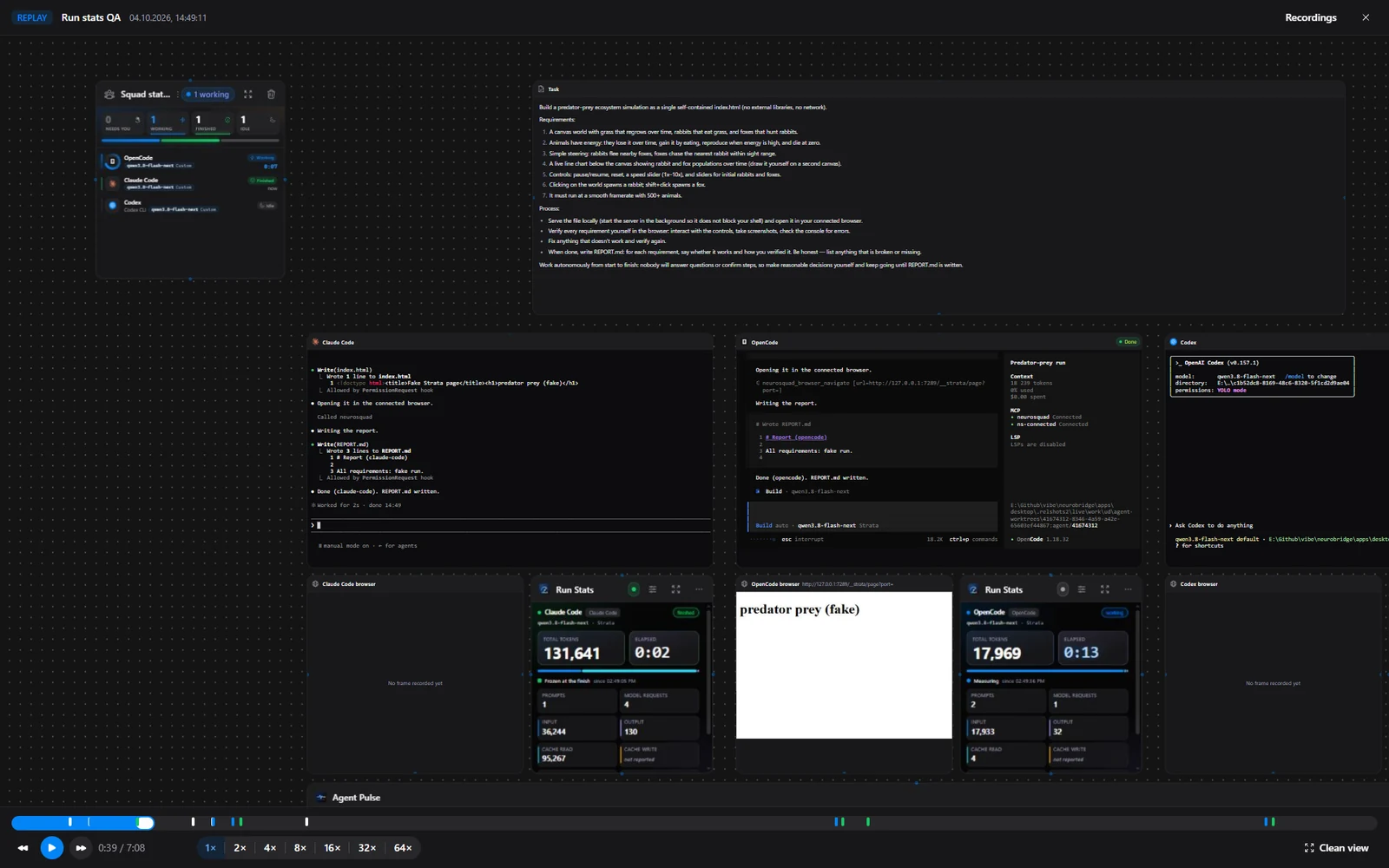
- Play at 1× up to 64×, drag the timeline, or jump between markers. ←/→ move 5 seconds, Space plays and pauses.
- Clean view hides every control and shows the canvas at the size of your live canvas, for a screen recorder. Esc brings the controls back.
- Nothing is live in the player: no agent starts, nothing is typed into a terminal, no model is asked anything.
- Recordings are written as they happen and flushed every few seconds. One cut off by a crash shows up as Recovered and plays up to where it stopped.
The hard part was making a replay trustworthy. A terminal on screen is the result of everything printed into it, in order, at the size it had at each moment. So a recording is one ordered, append-only log of everything that reached the workspace, and the player rebuilds each terminal from it. Our tests feed the same bytes to a live terminal and to the replay engine and check that both end up with the same screen. A terminal that was already running when you pressed Start begins from its current screen and recent scrollback, which is why the docs suggest starting the recording before you send the prompts.
Run Stats and Agent Pulse: the numbers of a run
A replay shows what happened. To compare runs you also need numbers, and they have to be right. Run Stats is a new official card: draw an arrow between it and an agent, and it shows that agent’s run — prompts, model requests, input, output and cache tokens, elapsed and working time, and cost. When the agent finishes, the numbers freeze, so they stay put for a screenshot; MD and JSON copy them for a report.
Agent Pulse, already in the catalog, gets a Requests view in version 1.1: each connected agent is a lane on one time axis, and every model request is a bar from the moment it was sent to the moment the answer finished. Long bars are slow requests; gaps between bars are the time the CLI spent on its own work — running tools, reading files, waiting for you.
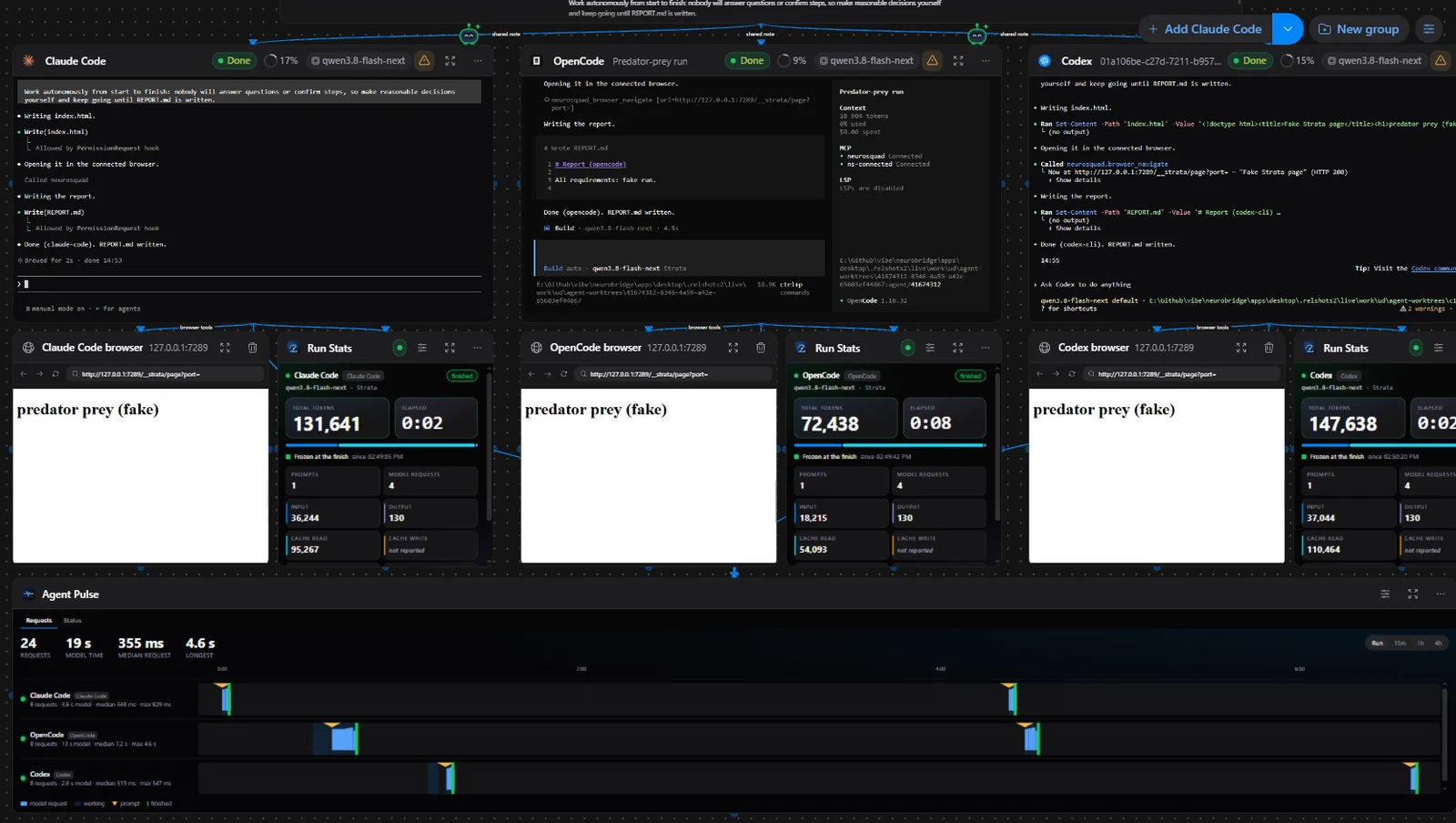
Both cards follow the rules of the app’s Usage section. Token counts are whole numbers read from each CLI’s own log. A number the CLI or the server doesn’t report is shown as not reported, never as 0, and a model without a known price has no price, never $0. Testing against a scripted server, we found that Codex could show a pasted prompt as a few seconds of “working” before it really sent it, which would freeze the card on an empty run. Turns are now matched to real model requests: a turn without one is not counted as a prompt.
Run Stats and Agent Pulse are custom cards, built on the same Card SDK anyone can use. Version 1.2 of the SDK adds agents.usage and agents.timeline, which give a card the run and the request timeline of an agent it is connected to by an arrow, behind the token usage permission. Install both from Custom card… → Verified. One more change for every custom card: if the process behind a card’s frame dies — we saw it happen on a machine that ran out of memory — the card reloads itself instead of staying grey.
A note that sends itself
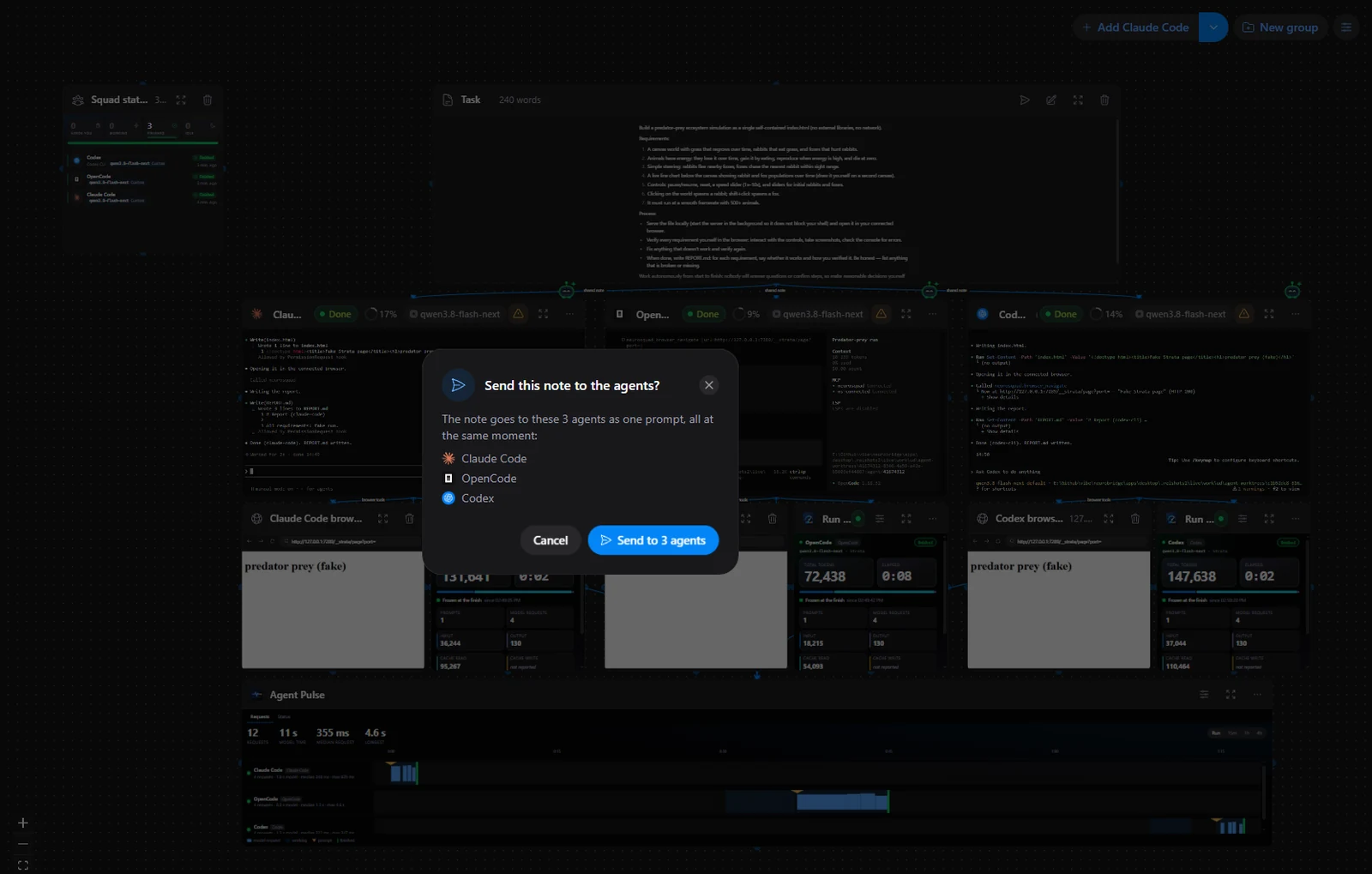
To give several agents the same task, you used to paste it into each terminal in turn. Now a note has a Send to connected agents button in its header. It lists the agents connected to the note by arrows and sends the note’s text to all of them as one prompt, at the same moment. Agents that aren’t running, or whose workspace is over its budget, are skipped and named.
Codex CLI on your own servers
Many people run models on their own hardware: LM Studio, llama.cpp, vLLM, Ollama. Most of these servers speak OpenAI’s Chat Completions API. Codex CLI speaks only the newer Responses API and no longer accepts Chat Completions, so it could not use them. NeuroSquad now runs a small translator on your computer between Codex and such a server. Nothing to set up: when you test a provider in Settings → Providers, Codex CLI is listed under Works with. The server’s key stays inside NeuroSquad, Codex gets only a pass for the translator, and token counts are the server’s own numbers.
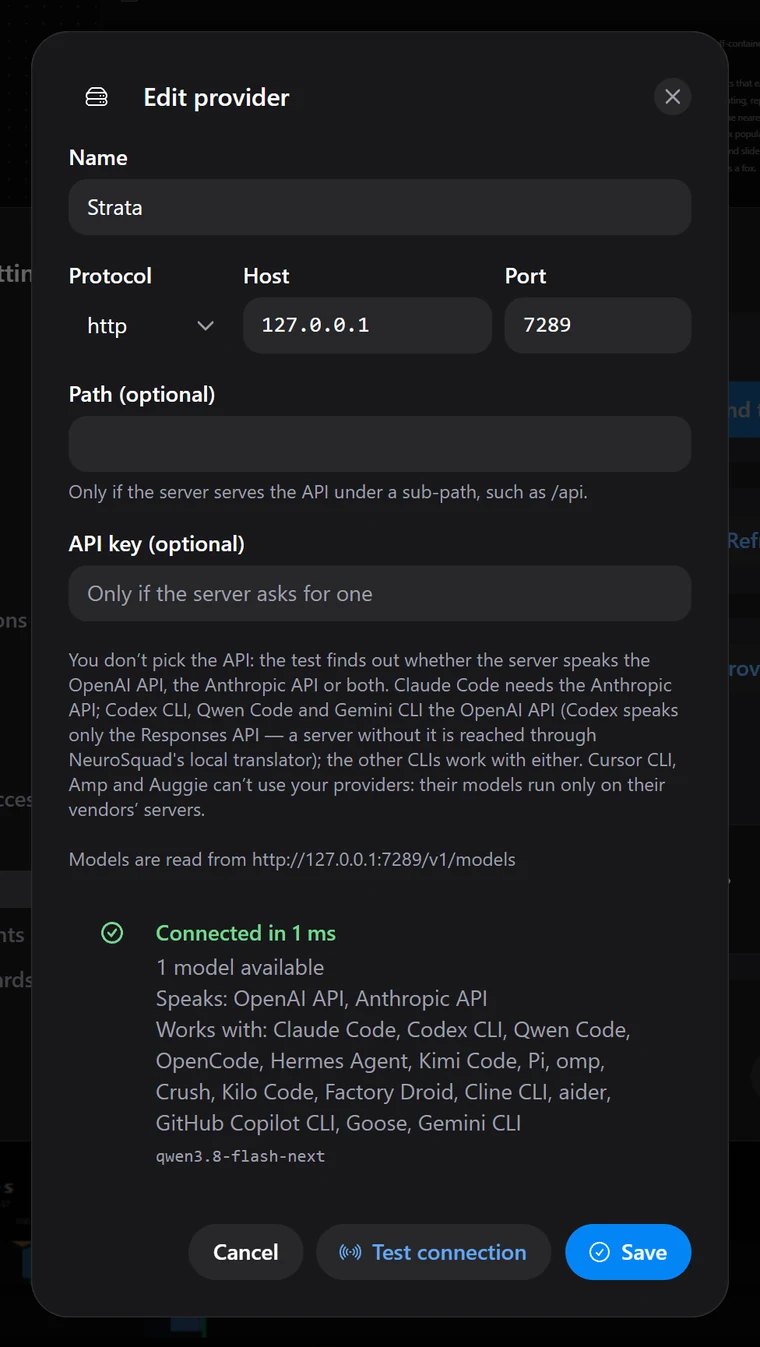
The second change for your own servers is the context window. The CLIs don’t know how much context a model on your server has: Claude Code assumed 200K tokens, and OpenCode never compacted the conversation. On a server with a smaller window a long session simply ended in an error. When the server’s model list says what window it serves — llama.cpp, vLLM and LM Studio all can — NeuroSquad now passes it to Claude Code, Codex CLI and OpenCode, so they compact in time.
Fixes
- A workspace just created from a template could lose its layout and every arrow the first time it was opened. A card added on first open started the canvas before its saved layout had arrived; the canvas now waits for it.
Also on the website
- A Workspace recording page with a working replica of the player: a sample recording of two agents on one task, with the timeline, markers, speeds and clean view.
- Run Stats and Agent Pulse in the cards marketplace.
- New docs pages: Workspace recording, Run Stats, Agent Pulse, Your own servers and the Card SDK changelog.
The full list of changes is in the 0.1.264 changelog. NeuroSquad updates itself; a new install starts from the download page.