nsq: NeuroSquad in your terminal, open source
Run Claude Code, Codex, OpenCode or any command side by side in one terminal dashboard, close it, and get called — with the question — when an agent needs you. Free, MIT, no account.
Today we are releasing nsq 0.1.0, a preview of the terminal version of NeuroSquad. It does the one job the desktop app does first — run several AI coding agents and show which one needs you — without a window, a canvas or an account. It is open source under the MIT license, runs on Windows, macOS and Linux, and installs from npm: npm i -g neurosquad, then nsq.
npm i -g neurosquad          # or try it: npx neurosquad
nsq run claude "fix the flaky checkout test" --worktree
nsq run codex --name reviewer
nsq run -- npm run dev       # any command
nsq                          # the dashboard
Why a terminal version
Many people who run coding agents live in a terminal: on a Linux box, on a server over SSH, inside a dev container, or simply by preference. The desktop app cannot follow them there. What they need is the same thing the desktop gives — know which agent is working, which one is waiting for you and what it is asking, and which one is done — in the place they already are.
So nsq is deliberately small. It is not the canvas in text mode; it is the part of NeuroSquad that answers “do any of my agents need me right now?”, plus the few things that make running several agents at once practical: a daemon, worktrees, cost, notifications.
What it does
- A daemon owns the agents.
nsqstarts it on demand. Close the dashboard or the whole terminal window and the agents keep running; opennsqagain and they are where you left them. Afternsq downor a reboot,nsq upbrings back the agents that were running and resumes their sessions. - A dashboard of live terminals. Workspaces and their agents in a sidebar, the selected workspace’s agents as a grid of live terminals. Enter opens one full screen, where every key goes to the agent; Ctrl+] goes back to the grid.
- Exact status from each CLI’s own hooks. Working, needs you with the CLI’s own question (“Would you like to run the following command?”), finished — reported by Claude Code’s hooks, Codex’s hooks and an OpenCode plugin, not guessed from the screen. For Claude Code, the session transcript settles what hooks don’t report, such as an interrupt or an API error.
- Answer without switching.
y,aandnanswer the selected agent’s permission prompt — yes, always, no — right from the grid;iinterrupts with the key that CLI actually uses;ssends a prompt andSqueues one for when the current turn ends. - Notifications and sound. A native notification when an agent needs you or finishes — one per agent, withdrawn when it starts working again. Where no native notification can show, for example over SSH, the dashboard rings its own terminal instead.
- A git worktree per agent.
--worktreegives an agent its own checkout on its own branch, so two agents never edit the same files;nsq diffshows what it changed. - Cost per agent.
nsq costreads each CLI’s own logs: tokens as whole numbers, and a model we have no price for shows “no price”, never $0. - OpenRouter built in.
nsq openrouter set-keystores the key in the OS keyring;--provider openrouter --model <id>runs an agent through it. The key goes only into that agent’s environment, and requests carry NeuroSquad’s OpenRouter attribution. - Local voice dictation. Press
v(or a global hotkey) and speak; recognition runs on your machine with an open model downloaded once. The text is pasted into the agent’s input and never sent — you press Enter.
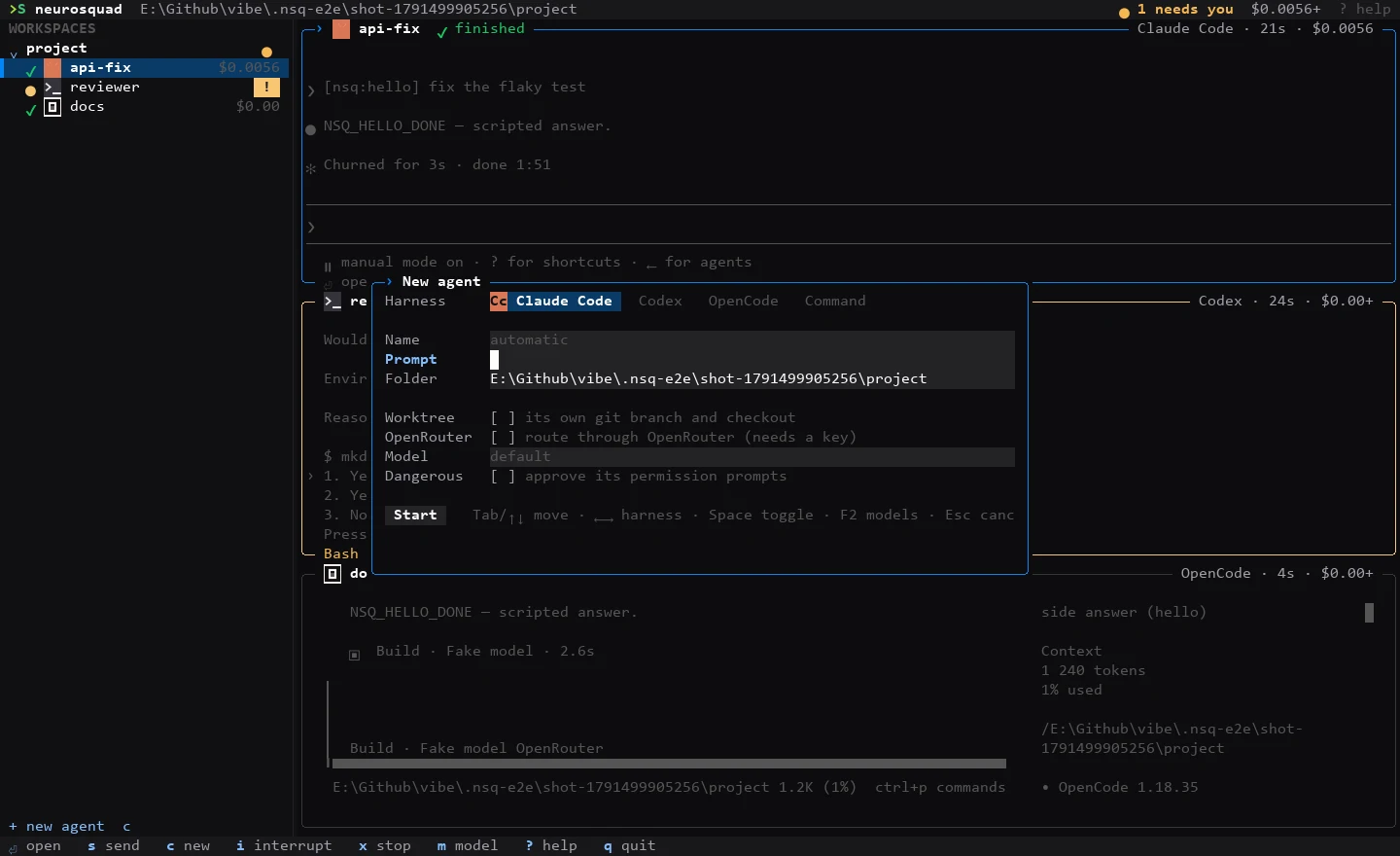
It supports Claude Code, Codex and OpenCode (both 1.x and 2.x) with full status, and any command as an agent: a dev server, a test watcher, another CLI. A plain command has no hooks, so nsq only shows it as working while it prints and finished when it goes quiet; it never claims such a command needs you.
How it knows, and what it never touches
Every agent gets its own layer of flags, environment variables and files in nsq’s folder. Your ~/.claude, ~/.codex and opencode.json are never written. The hooks report to a loopback address with a per-agent token, and the facts go through the same state machine the desktop app uses: a hook is a fact, your keypress in a waiting agent counts at once, and silence is only a fallback.
That machine is not new. It, together with the hook setups, the Claude Code transcript reader and the usage parsers, now lives in @neurosquad/core, an open-source package that nsq is built on. The NeuroSquad desktop app consumes the same core: the modules the two shared are now one copy of the code, published under MIT. When we fix how a CLI reports its status, both get the fix.
A dashboard that draws its own cells
Each tile is a real terminal emulator fed by the daemon, and the dashboard paints only the cells that changed, at most about 30 times a second and only when something did. Decorative animation — the working spinner, the needs-you pulse — pauses while an agent is open full screen and when the terminal loses focus, and NSQ_NO_ANIMATION=1 turns it off. Where the terminal can show images (kitty, iTerm2, sixel), the tiles carry the CLIs’ logos; elsewhere they get small glyph badges.
Your phone, experimental
nsq phone on --lan lets a phone on the same network see the agents, read their screens, send a prompt, answer a permission prompt and interrupt. nsq phone pair prints a link and a QR code; the link carries the pairing token, so treat it like a password, and nsq phone rotate signs every phone out. A paired phone cannot start agents, change settings or type arbitrary keys. Phone access, with its mobile page, is off by default and marked experimental in this preview.
nsq or the desktop app
They solve the same first problem and share the same core, so pick by where you work. nsq is for terminals, Linux, servers and SSH sessions: free, open source, no account, no telemetry. The desktop app for Windows and macOS is the whole workshop: agents as cards on a canvas, many more agent CLIs, agents that talk to each other by arrows, plugin cards, templates and recordings. Nothing from that list is in nsq, and it is not planned to be — nsq stays small.
What “preview” means
- It is version 0.1.0: commands, flags and the config file may still change before 1.0.
- It needs Node.js 22.13 or newer. Native parts (the terminal, the keyring, dictation) install as prebuilt binaries, checked in CI from the packed npm package on Windows, macOS and Linux; voice dictation is not available on Windows arm64.
- Three CLIs have full status today. More come on demand — the repository has an issue form to request one.
- There is no telemetry, and no account is needed.
nsq loginexists for an optional NeuroSquad account, and nothing in nsq requires it.
Open source
The code is on GitHub at glmn-ai/neurosquad-cli, MIT-licensed: the CLI, the shared core and the packages around it (the terminal tiles, notifications, dictation, the phone API). Bug reports, harness requests and pull requests are welcome — the contributing guide explains how we work. Everything about installing and using nsq is on its page.