Plan limits you can see, accounts you choose
How much of your 5-hour and weekly windows is left, on every card — without NeuroSquad ever touching your login. And when one account runs dry, another is a click away, never an automatic switch.
If you run Claude Code or Codex on a subscription, the thing that stops your work is rarely the model — it is the plan. Both CLIs meter use in rolling windows: a 5-hour one and a weekly one. When several agents share one account on a canvas, those windows drain several times faster than in a single terminal, and until now the first sign was a card that stopped mid-task with “limit reached”.
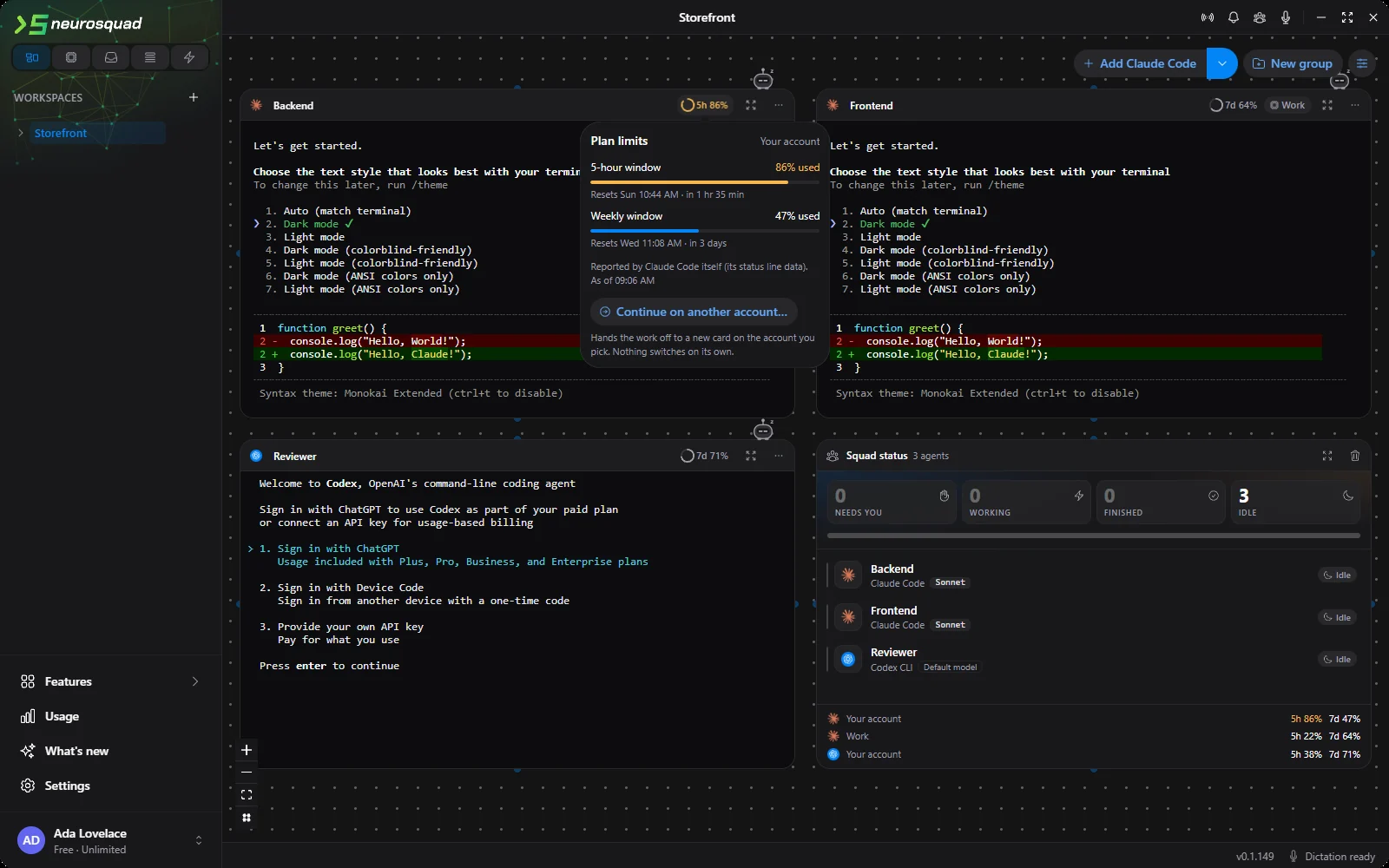
NeuroSquad 0.1.149 makes the windows visible and gives you somewhere to go when one is full. Every Claude Code and Codex card shows how much of its account’s plan is used; Settings has a new CLI accounts section for several sign-ins of the same CLI — say Personal and Work; and a card near its limit can hand its work to a new card on another account with one click.
Where the numbers come from
The obvious way to get plan usage is to take the login token the CLI keeps on disk and ask the vendor’s servers directly. We decided early that NeuroSquad would not do that, and the reason is not caution for its own sake. Claude Code’s legal and compliance page says that developers may not collect, store or intermediate Claude.ai credentials or session tokens, and that sign-in must complete through Anthropic’s own flow. Codex’s documentation asks you to treat its auth file like a password. A tool that reads those files to call a private endpoint puts your account at risk, not ours.
So the meters use only what each CLI hands to a local integration on its own. Both CLIs turn out to do exactly that, in different places.
Claude Code: the status line
Since version 2.1.80, Claude Code passes a rate_limits object to the status line — the small script that draws the footer under the prompt. It carries five_hour and seven_day windows (and a spend limit, where one applies), each with the percentage used and the reset time. It is documented, with an example on how to display it, and it appears for Pro and Max subscribers after the first answer of a session.
A NeuroSquad card already starts Claude Code with a settings file of its own, layered over yours, which carries the lifecycle hooks behind the working / needs you / finished statuses. The card now also sets a status line there: a one-line curl that forwards the status line’s input to the app, with the same per-agent token as the hooks.
There was a catch. That settings file outranks yours, so the moment the card sets a status line, your own status line would disappear. Many people have one they care about. The app therefore reads your status line command (read only, from your settings files), runs it itself with the very same input, in the same folder and the shell Claude Code would pick — Git Bash, else PowerShell — and answers with its output. Your footer keeps showing exactly what it showed before, including its padding and refresh interval. If you have no status line, the card shows a dim meter such as 5h 23% · 7d 41% instead.
Codex: its own session log
Codex writes a session log (a “rollout”) as it works, and its token-count events carry a rate_limits snapshot: a primary and a secondary window, each with the percentage used, its length in minutes and its reset time. The app already reads that file for a card’s answers and context size, so reading the plan windows costs nothing extra — no token, no network request.
Because the log is on disk, a Codex meter exists before any card runs: at start and on Refresh, the app reads the newest log of each Codex account. Two details came from testing. Windows are named by their real length rather than assumed to be “5 hours” and “weekly” — on a free plan the long window turned out to be 30 days. And a snapshot for a separate per-model allowance is skipped, so it cannot overwrite the plan’s own numbers.
What you see
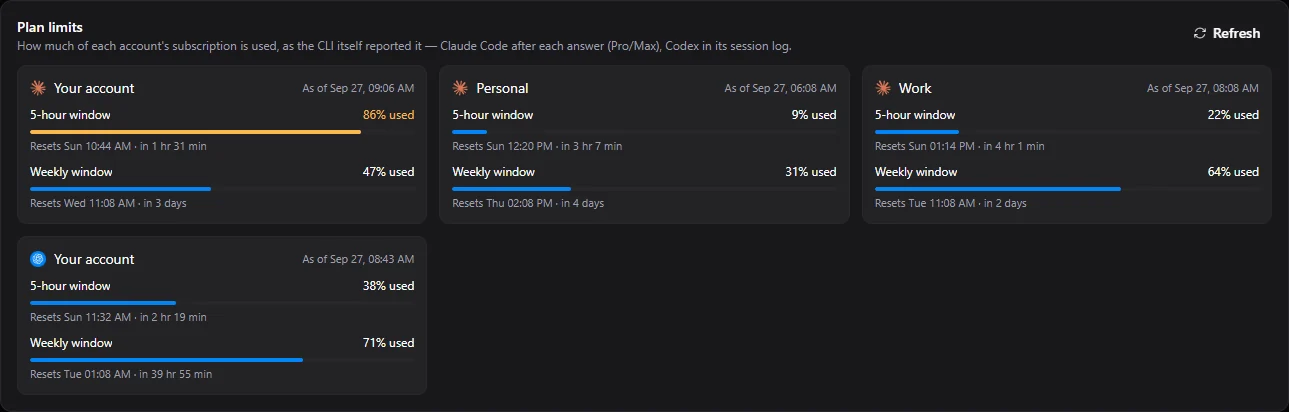
- On the card: a ring with the fullest window of the card’s account — amber from 80 %, red from 95 %. It updates when the CLI reports and once a minute for a passing reset, never on every frame.
- A heads-up at 80 % and at 95 %, once per window and reset period, under the existing “An agent hit its usage limit” notification switch. Clicking it takes you to the card that reported.
- Usage → Plan limits, a strip at the bottom of the Squad board, and a new “By account” tab that splits token use per account.
- Honest staleness: the last numbers survive a restart and are labelled with their time; once a window’s reset passes, it is shown as started over until the CLI reports again.
The meter also helps the limit chip that was already there. When a CLI stops with a limit message that has no reset time, a full window now supplies one — so the chip can say when the work can continue, and auto-continue knows when to send it.
Accounts: Personal and Work
Keeping several accounts of one CLI is something both vendors document. Claude Code’s environment-variable reference describes CLAUDE_CONFIG_DIR as useful for running multiple accounts side by side; Codex keeps its whole state, sign-in included, under CODEX_HOME. A NeuroSquad account profile is simply one such folder, and a card on that profile starts its CLI pointed at it.
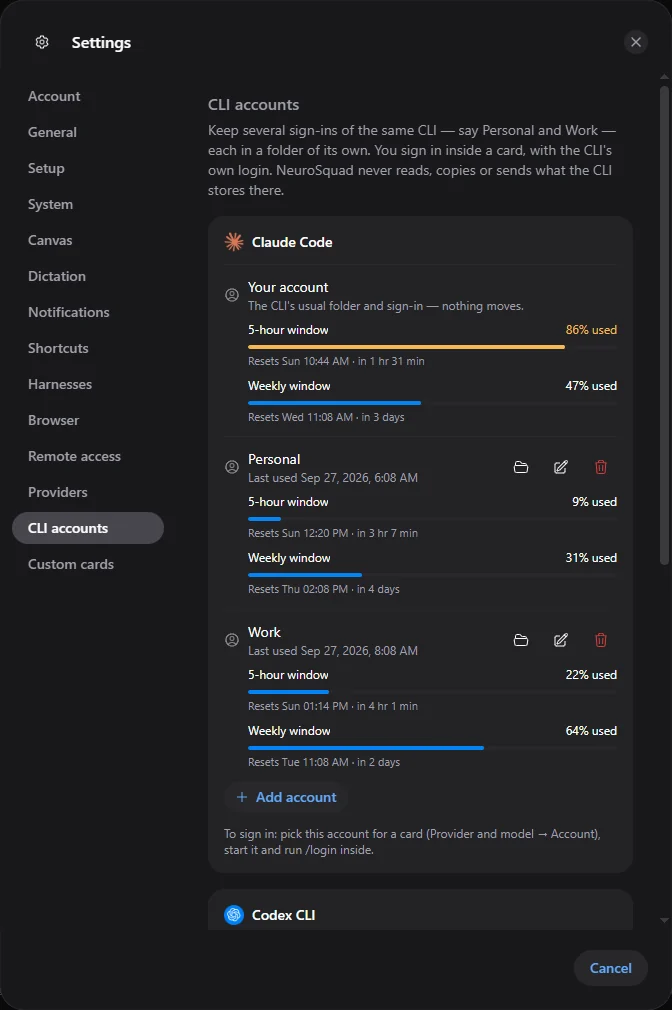
You sign in inside the card, with the CLI’s own login: /login in Claude Code, the sign-in screen Codex opens by itself. A new profile starts empty on purpose. Copying your settings into it would have been convenient, but settings files can carry keys — environment variables, an API-key helper — and a copy is one more place for them to leak from. Your default account stays exactly where it was.
Everything that reads a card’s files follows its folder: the transcript behind the journal and hand-off, standups, the context meter, Codex’s config, and the Usage section. The plan meters are per account, so two cards on Work share one meter and a card on Personal has its own.
“Continue on another account”
When a card gets close to its limit, the popover on its meter and the limit chip both offer Continue on another account…. It opens the hand-off dialog you may already know, with one new field: the account. You get a new card beside the old one, in the same folder, with a summary of the work typed into it — not sent, so you can read it first.
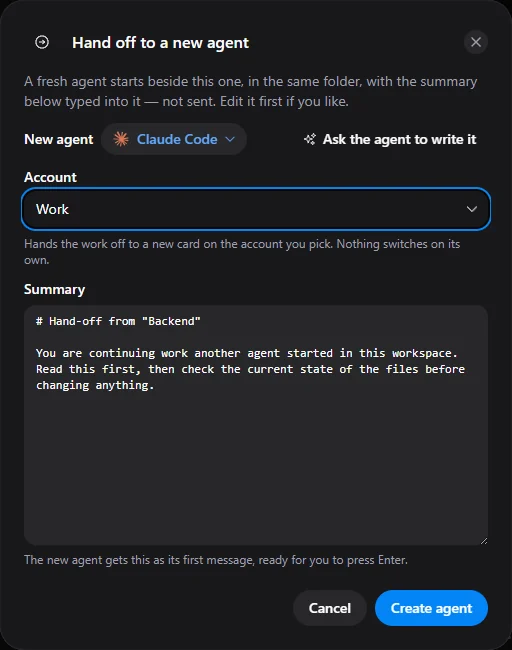
What it deliberately does not do is switch by itself. Rotating accounts automatically whenever one runs out would be circumventing rate limits, which is exactly what the vendors’ terms prohibit — OpenAI’s in those words, Anthropic’s usage policy for multiple accounts. So a switch is always your click, it always creates a new card rather than re-routing a running one, and nothing in the app talks about “bypassing” limits. Accounts are Personal and Work, not a pool.
What we left out, and why
- A Claude meter without a running card, or on an API-key login. The only source would be the private endpoint with your token.
- Meters for the other CLIs. None of them hands plan windows to a local tool. Most bill per token through a provider, which the Usage section already counts; their “limit reached” messages still feed the limit chip.
- Profiles for other CLIs, for now. Claude Code and Codex are the two with documented per-account folders and subscription windows.
- Telemetry for this feature. None.
The full list of changes is in the 0.1.149 changelog.